Application Report of the TIMCAN Project
Version 1.0.0
5.6.2019
Public
Hanna Alatalo
Jarkko Kuivanen
Elisa Nauha
Jere Ojala
Kimmo Urtamo
University Of Jyväskylä
Faculty of Information Technology
Signatures
| Accepted By | Date | Signature | Name Clarification |
|---|---|---|---|
| Project lead |
Elisa Nauha |
||
| Customer representative | Ari Huhta |
||
| Supervisor |
Jukka-Pekka Santanen |
Change log
| Version | Date | Changes | Made by |
|---|---|---|---|
| 0.0.1 | 3.5.2019 | The document was created. | HA |
| 0.0.2 | 6.5.2019 | Paragraphs were edited. | HA |
| 0.0.3 | 8.5.2019 | Added the paragraph for report exporting feature and functional testing. | JO |
| 0.0.4 | 8.5.2019 | Added more concepts and edited the introduction and paragraphs for the inline plugins. | HA |
| 0.0.5 | 16.5.2019 | Added the chapter about goal fulfillment. | KU |
| 0.0.6 | 17.5.2019 | Added the description about the dropdown plugin. | KU |
| 0.0.7 | 17.5.2019 | Wrote about testing results. | EN |
| 0.0.8 | 17.5.2019 | Improved Chapters 6 and 7. | KU |
| 0.0.9 | 17.5.2019 | Edited Chapters 1, 4, 5 and 6. | HA |
| 0.0.10 | 20.5.2019 | Minor adjustments were made to Chapters 4 and 6. | KU |
| 0.0.11 | 20.5.2019 | Added goals and needs to Chapter 3. | HA |
| 0.0.12 | 21.5.2019 | Improved several chapters. | KU |
| 0.0.13 | 21.5.2019 | Edited several chapters. | HA |
| 0.0.14 | 22.5.2019 | Improved Chapter 6. | KU |
| 0.0.15 | 22.5.2019 | Improved several chapters. | HA |
| 0.0.16 | 23.5.2019 | Finished Chapter 6. | KU |
| 0.0.17 | 23.5.2019 | Improved chapters and added the summary. | HA |
| 0.0.18 | 24.5.2019 | References were edited. | JK |
| 0.1.0 | 24.5.2019 | Made the document public to the project organization. | HA |
| 0.1.1 | 28.5.2019 | Improved Chapter 6.2. | HA |
| 0.2.0 | 29.5.2019 | Improved the document based on supervisor feedback. | KU |
| 0.3.0 | 3.6.2019 | Improved the document based on supervisor feedback. | KU |
| 1.0.0 | 5.6.2019 | The document was approved by all parties. | KU |
Project organization
Project group
- Hanna Alatalo (HA),
hanna.m.alatalo@student.jyu.fi - Jarkko Kuivanen (JK),
jarkko.t.kuivanen@student.jyu.fi - Elisa Nauha (EN),
elisa.k.nauha@student.jyu.fi - Jere Ojala (JO),
jere.j.ojala@student.jyu.fi - Kimmo Urtamo (KU),
kimmo.j.urtamo@student.jyu.fi
Customer representatives
- Ari Huhta,
ari.huhta@jyu.fi - Dmitri Leontjev,
dmitri.leontjev@jyu.fi
Supervisors
- Visa Naukkarinen, technical supervisor,
visa.naukkarinen@gmail.com - Jukka-Pekka Santanen, corresponding supervisor,
santanen@mit.jyu.fi
TIM experts
- Mika Lehtinen ,
mika.k.lehtinen@student.jyu.fi - Vesa Lappalainen,
vesa.t.lappalainen@jyu.fi
Contact information
- E-mail lists
timcan@korppi.jyu.fitimcan_opetus@korppi.jyu.fi
- E-mail archives
Information about the document
Document name: Application Report of the TIMCAN Project
Summary: The adaptive feedback functionalities added to TIM were developed for The Centre for Applied Language Studies during the TIMCAN project in spring 2019. The features to create and answer adaptive feedback tests were implemented. Additionally, two new question types were developed. The document describes the needs and goals of the application, implementation details, the summary of testing results and ideas for further development.
Keywords: Adaptive Feedback, Application Report, Architecture, Centre for Applied Language Studies, Drag&Drop, Dropdown, Dynamic Assessment, Functionality, Further Development, ICAnDoiT, Implementatation, Inline Plugin, Plugin, Project Goals, TIM, TIMCAN.
1. Introduction
Dynamic assessment is a research domain in applied language studies. It is based on adaptive feedback and a detailed report of learner performance during a test. The reports can be used in assessment of learners' learning potential.
In computerized tests the learner is displayed question items and feedback in between them. ICAnDoiT is a computerized test application that makes possible to create tests and the corresponding feedback. The goal of the TIMCAN project was to reimplement the functionalities in TIM.
Adaptive feedback is a concept of giving a learner changing feedback depending on their answers. Incorrect answers will cause the learner to receive more detailed feedback when answering question items during a test. Multiple levels of feedback are defined by teachers or researchers depending on the context of the test.
The adaptive feedback functionalities to TIM were developed by the TIMCAN project in the spring of 2019. The functionalities replace the ICAnDoiT application used by The Centre for Applied Language Studies.
Chapter 2 explains the concepts regarding adaptive feedback and application development used in the document. Chapter 3 explains the application needs and the goals derived from them. Chapter 4 describes the application components developed in the project. Chapter 5 is a summary of the application test results. Chapter 6 describes fulfillment of the goals set for the project, weak implementation solutions and ideas on how to improve the application further.
Other essential documents written in the project are the requirement specification document [1], user manual [2], test plans for functional testing [15] and usability testing [16] and [17], test reports for functional testing [18] and usability testing [19], [20] and [21] as well as instructions for further development [11], [12], [13] and [14].
2. Concepts
The chapter describes the concepts from adaptive feedback and software development that are used in the document.
2.1 Adaptive feedback
The following concepts regarding adaptive feedback are used:
- Adaptive feedback is feedback that changes with an answer and the current feedback level.
- Dynamic assessment is the analysis of learners' learning potential derived from adaptive feedback.
- ICAnDoiT is an application used by The Centre for Applied Language Studies in adaptive feedback testing.
- Test creator is the user who creates a test with adaptive feedback.
- Learner is the user who is taking a test with adaptive feedback.
- Question item is a single question within a task containing a dropdown or drag&drop choice.
- Dropdown is a question type where only one choice can be selected from multiple items.
- Drag&Drop is a question type where words or figures in an answer will be dragged from one place to another or into a different order.
- Practice item is a question item, that will not have its contents saved and is presented at the beginning of a task.
- Task is a set of similar question items having unified feedback levels.
- Test contains one or multiple tasks.
- Feedback level is the classification of the feedback given to the learner. It depends on the right and wrong answers of the learner and the current feedback level.
- Stopping condition is a condition defined in a task, after it's fulfilled the task shall end.
2.2 Development concepts
The following concepts regarding software development are used:
- TIM is an interactive learning environment developed in University of Jyväskylä.
- TIM document is a document in TIM created by a user.
- TIM block is a block of text, a plugin or a combination of text and inline plugins in a TIM document.
- Plugin is a part of TIM system that adds functionality to documents.
- Inline plugin is an interactive component that can be inserted within text.
- ITimComponent interface is the interface that TIM plugins implement.
- Docker is an application where you can run programs in a virtual environment.
- Container is a piece of virtual environment in docker.
- YAML is a markdown language used in creating TIM documents.
- Python is the programming language used in the software components of TIMs server.
- CSS is a language used in defining web layout.
- HTML is a markup language for WWW site creation.
- JavaScript is the programming language used in WWW site programming in browsers.
- TypeScript is an extension of JavaScript language improving on its type support.
- AngularJS is a web framework used with HTML.
3. Needs and goals of the application
The goals and needs of the application are introduced in the chapter. The goals and their fulfillment are described in detail in Chapter 6.
3.1 Needs
ICAnDoiT application used in dynamic assessment tests is not currently maintained and complete reimplementation was chosen instead of updating of application. The TIM system is maintained and therefore it was chosen as the basis of the application. Additionally TIM already had functionality relating to interactive content and exporting reports of users' answers.
As TIM is a learning platform, adaptive feedback could also be used as an educational tool. Current feedback system for example in multiple choice questions is only binary between correct and incorrect. One of the project goals was to make the functionalities available for all TIM users. The functionalities should also be usable on all platforms that TIM supports such as mobile devices.
In ICAnDoiT there are two question item types: drag&drop and dropdown. A task includes question items of one type with similar grammar rules. The feedback presented is written by the test creator when creating a task and then assigned for each question item. A test can contain one or multiple tasks. In the ICAnDoiT application users designated as admins can create tests.
Since the ICAnDoiT application is for research purposes, similar features should be present in TIM. TIM is an open platform and users are free to browse TIM documents. Learners ability to browse tasks and question items freely must be limited and the learner must be displayed only either instructions, question item or feedback during a test.
3.2 Goals
The goals for the application were to add to TIM
- an adaptive feedback functionality,
- a dropdown question type,
- a drag&drop question type,
- an ability to export more extensive report of user answers,
- a user interface limiting the amount of visible content not relevant to learners doing a test.
All of the set goals were met during the project.
4. Application architecture and functionalities
The chapter describes the architecture for the application. The functionalities developed during the project are described briefly. The details of the solutions are not described and they are described in the instructions for further development [3] and source code [4].
4.1 Architecture of TIM
TIM consists of connected Docker containers that are displayed in Figure 1. The fundamental architecture in TIM was not affected by the project. Additionally, there were no changes made to TIM's database. The architecture of TIM is described in the document Johdatus TIMin kehitykseen [5] (in Finnish).
![Figure 1: TIM's architecture [5].](/images/188468/timrakenne.png)
4.2 Architecture of plugins
The architecture of plugins used in TIM is described in detail in the document Plugin speksi [6] (in Finnish) and in the project briefing documentation [7] (in Finnish). There were no changes to the architecture of plugins made by the project group.
The following figure illustrates the interaction between the plugins in an adaptive feedback task:
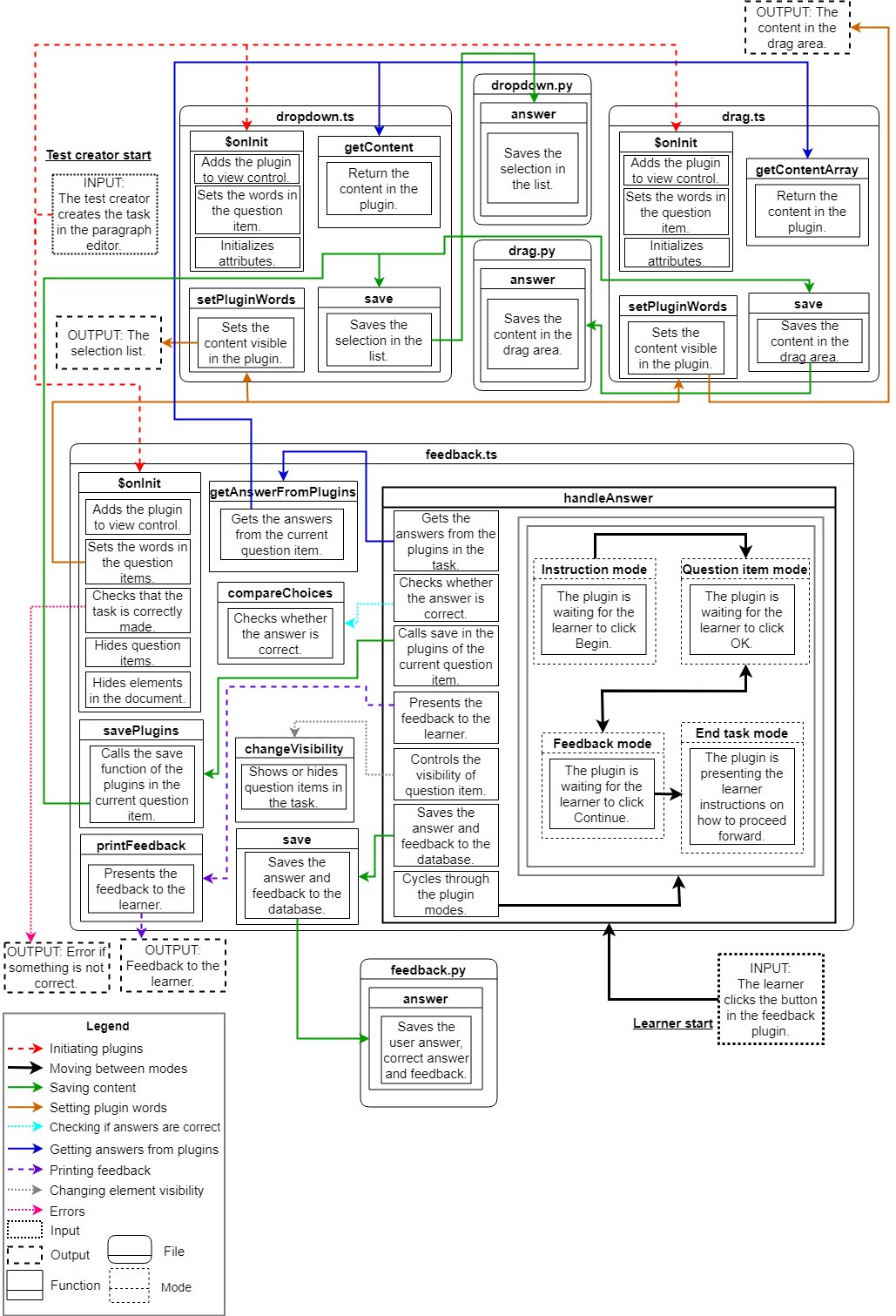
4.3 Inline plugins
The inline plugin specification is defined in the TIM briefing document [7] (in Finnish) for the project. The project developed two inline plugins, drag&drop and dropdown, that may be used with or without a feedback plugin. They can be used within a text paragraph to include interactive parts where words are selected by the user from a dropdown menu or by dragging and dropping.
The drag&drop inline plugin makes it possible to drag, drop and reorder the content inside drag plugin areas in a TIM document. Draggable words or figures can be copied or moved from one drag&drop area to another. The drag&drop plugin areas can have a defined type of draggable words they can contain. For example, article can be a type for a draggable word while the words can be a, an and the. Drag&drop plugins can be used in drag&drop type question items. Manual saving option can be enabled if the drag&drop plugin is used without a feedback plugin. Description of all features can be found in the user manual [8].
Drag&drop is an AngularJS component developed with TypeScript. Drag and drop functionality is implemented with Angular Drag And Drop Lists library [9] and related CSS options. Additionally Mobile drag drop library [10] is required to enable touch screen support. Both libraries are under MIT license.
A more detailed description of the drag&drop plugin is available in the manual for further development of the drag plugin [11].
The dropdown inline plugin is a word selection control similar to a HTML select element. The items inside it are presented as a dropdown list where the user can select one of the options.
You can either specify the items of a dropdown list to be shown when creating the plugin or it can receive the content from other plugins implementing the ITimComponent interface. By default the plugin is designed to work with a feedback plugin and does not save the selection without a function call from it. You can enable an autosave where the plugin immediately saves the selection when the user selects another item from the list. You can also shuffle the order of the items in the list or change the plugin presentation to a list of radio buttons.
A more detailed description of the dropdown plugin is available in the instructions for further development of the dropdown plugin [12].
4.4 Feedback plugin
The feedback plugin is a plugin that can be used with drag&drop or dropdown inline plugins to implement adaptive feedback. There is one feedback plugin in each task. The question items and the inline plugins contained in them are defined in the TIM document markdown. The answer choices and their corresponding feedback are defined in the feedback plugin.
The user interface and most of the functionality is implemented as an AngularJS component. The serverside code has a route to save the information presented to the learner. Let us describe how the plugin works.
- When starting a task the feedback plugin is in the
instructionmode, waiting for the learner to read the instructions and to click the Begin button. - After clicking Begin the plugin changes to the
question itemmode, where it waits for the learner to select an answer to a question item presented to them. - After the learner clicks the OK button the plugin compares the learners answer to the correct answer, shows feedback to the learner, saves the selections in the question items to the database and moves to the
feedbackmode. - When the learner clicks the Continue button after reading the feedback, the plugin saves the feedback to the database along with the correct answer and the learners answer to the question item.
- Next the plugin checks if any of the stopping conditions to end the task are met. If they are, the task has ended and the plugin moves to the
end taskmode. Otherwise the plugin moves back to thequestion itemmode in step 2 and presents another question item to the learner. This continues until there are no more question items to be presented. At that point the plugin moves automatically from the feedback mode to theend taskmode. - The plugin is in the
end taskmode and guides the learner forward.
A more detailed description of the feedback plugin is available in the instructions for further development of the feedback plugin [13].
4.5 Report for dynamic assessment
A new option called Create Feedback Report was added to the dropdown menu of Answer dialog in the Answer tab. The option opens the Export to csv dialog, where one can select appropriate parameters to be included for the CSV report format. After selecting the options one can export the test results into a CSV format file.
The server searches all of the plugins in the document or from all of the documents in the folder, depending on the given export options. From the plugins the server searches for any possible feedback plugins and then the feedback data is collected from the database. The data of the feedback plugin is compiled into CSV format and opened in a new tab of the browser as a TXT file.
A more detailed description of the feedback plugin is available in the manual for further development of the exporting report functionality [14].
5. Summary of testing results
The application functionalities were tested with functional testing and usability testing. The testing plans were written for the functional testing [15] and usability testing [16]. Only few automatic tests were written for exporting reports and the view for the test participant. Writing meaningful automatic tests for other developed functionality would have been challenging so they were omitted.
Minun puolestani saa sanoa (jos haluatte / jos se ei tule myöhemmin esiin) testien määrästä sen, että kehitetyille toiminnoille mielekkäiden autom. testien laatiminen olisi aika haastavaa.
—The functional testing report classifies its conclusions in three categories: Note, Error and Ok. The preliminary functional testing [17] had 10 Note conclusions and 5 Error conclusions. Most of Note conclusions were due to errors in the testing plan. The errors were related to the exporting of a feedback report or the presented error messages when building a task with errors. Both issues were fixed after the test session. The second testing session [18] had no errors and 9 Note conclusions that were mostly errors in the test plan. The minor problems with the application were fixed.
Usability testing was carried out in three sessions and the results are reported in the usability testing reports [19], [20] and [21]. During the testing three clearly unwanted functionalities were discovered. These were fixed right after the testing sessions. Using the results of the usability testing, recommendations for changes in the application were made. These changes were mainly to do with the templates for the tasks and the user manual for creating the tests.
6. Fulfillment of project goals
The chapter describes the requirements and goals set for the application and their fulfillment on a general level. A more detailed view as well as the states and priorities of the requirements can be found in the requirement specification document [1].
The application developed by the project group fulfills all the goals set for the application that were presented in Chapter 3.2. Chapter 6.3 describes weak implementation solutions while Chapters 6.4 and 6.5 present ideas for further development. The functionality developed in the project is intended to be used in production.
6.1 Requirements
The project implemented all of the functionality initially requested by the customer and all of the essential, important as well as possible requirements. All of the improvements and functionality not developed in the project were classified as ideas. Most of the essential and many of the important requirements were tested with functionality testing [18].
Most of the requirements that were not implemented had to do with rights management, restoring the state of a task to a learner and checking that the test is made correctly. As the project progressed, it was determined that there was no time to develop those functionalities because they were not highly prioritized in the beginning of the project or they would have required changes to the TIM system outside the scope of the application developed in the project.
Table 1 describes the amount of requirements that were implemented in the project and the amount that were not. The meaning of states and priorities as well as fulfillment of requirements by functionality are described in the requirement specification document [1].
| State/Priority | Essential | Important | Possible | Idea | Discarded | Total |
|---|---|---|---|---|---|---|
| In TIM | 5 | 9 | 0 | 0 | 0 | 14 |
| Approved | 0 | 0 | 0 | 0 | 0 | 0 |
| Tested | 30 | 32 | 0 | 0 | 0 | 62 |
| Completed | 14 | 52 | 12 | 0 | 0 | 78 |
| Unfinished | 0 | 0 | 0 | 0 | 0 | 0 |
| Not Started | 0 | 0 | 0 | 0 | 0 | 0 |
| Not Implemented | 0 | 0 | 0 | 21 | 3 | 24 |
| Total | 49 | 93 | 12 | 21 | 3 | 178 |
6.2 Changes to implementation during the project
The YAML syntax to be used to create a task went through a few iterations. The goal was always to try and make it fairly similar to the way the tasks were created in ICAnDoiT, which was met in the end quite well. The way the test is divided into documents inside a folder followed a plan to implement the whole test inside one TIM document.
Other than those no significant or sudden implementation changes were made. Rather, changes were incremental and based on previous plans and ideas stemmed from them. Some small modifications were made because of shifting requirements.
Implementation of the drag&drop functionality went trough multiple iterations. Using native HTML5 drag&drop functionality proved problematic especially since it doesn't support touchscreens. At first the Dragula [22] library was tried but it required a different architecture than TIM has. In the end the combination of Angular Drag And Drop Lists [9] and Mobile drag drop [10] libraries was chosen.
6.3 Weak implementation solutions
Creating a test similar to the ones in ICAnDoiT is problematic, because all of the control is happening in the feedback plugin. For example, previously there was an introduction explaining the backstory in the test, which is meant to be presented in its own separate TIM document in the developed application. However, because that TIM document shouldn't have a feedback plugin, we have to trust that the test creator creates the introduction correctly and makes a link from there to the first task document.
To hide some undesired elements in the page from the learner the test creator needs to add some settings and CSS to the settings of the TIM document. These can also be added to document preambles but neither of these ways are clear for a test creator with no experience using them. Ready-made document templates for the task documents were also considered, but they would require orientation as well.
The showing and hiding of the task instructions, question items and feedback is made by using CSS, which makes it possible for the learner to see elements in the page they were not intended to see by modifying the CSS in their Internet browser.
Dividing of the tasks into their own TIM documents brings its own problems with rights management. Granting and revoking the learner access to different documents could be a solution to this. There has to be certainty that the learner always completes the test the intended way. The other implementation solution was to create the whole test inside one TIM document, but that might have created other issues.
Checking of the learners answers and other functionality related to it in the feedback plugin is done in the front-end. This was a deliberate decision made in the beginning of the project. It leaves the test or exam into which the application is used exploitable by a crafty learner if they are left unsupervised. This is a problem that needs to be solved in further development either by moving the functionality serverside or by some other means.
The drag&drop plugin is implemented with an AngularJS library. There are some limitations to the functionalities in the plugin that are caused by the AngularJS library. Drag&drop functionality does not work well on touch devices, which forced some weak implementation solutions to get it working on them.
6.4 Ideas for future development of the inline plugins
Drag&drop and dropdown plugins were developed on the basis that they would only hold text strings. Adding support to other kinds of content as well might be useful.
The following two ideas would make the application more general use, because defining a string id to content and comparing the ids to each other is easier than comparing content in a strange format.
- A way to use tuples or some other data format in the content of the inline plugins should be added to allow easier comparison of images or similar content.
- Allowing the feedback plugin to set the content of the drag&drop and dropdown plugins in the data format above should be added.
Answer browser allowing the browsing of previous answers for the drag&drop plugin needs to be fixed before enabling it. Currently you can drag words from the previous answers to other drop areas indefinitely by switching between the answers.
The shuffling of words in the drag&drop plugin should be made in a way that removes the possibility of shuffling the words to the correct order when the plugin is used in an adaptive feedback task.
6.5 Ideas for future development of the feedback plugin
The feedback plugin was developed primarily for the Centre for Applied Language Studies and generality was a secondary concern. For that reason refactoring of the code may be necessary to support plugin types other than the two developed in the project. The suggested improvements to the feedback plugin are the following:
- Support for new plugin types and plugins setting their own content should be added to make the feedback plugin more generally usable.
- The way answers are checked needs to be made more secure to make the feedback plugin more appealing in less supervised exams or similar situations.
- More information to be shown to the learner might be useful. For example, one might want to dynamically show the feedback level they currently are in.
- By adding cumulative points to the feedback plugin a task could be used in school assignments or similar excercises.
- By allowing the definition of points to individual question items one could award answering harder questions correctly with more points.
- The
setPluginsfunction is called too many times unnecessarily. This should be optimized. - The correct answer to the current question item should be transferred to the plugins in the question item when setting their words. This way the drag&drop plugin can check that the words aren't shuffled to the correct order.
6.6 Ideas for future development of tasks
An improvement to be considered is fixing the position of the feedback plugin inside the task so that the confirmation button does not jump around when a question item is hidden or shown.
The creation of multiple tasks to the same document should be changed to work correctly. The two following problems happen because the element hiding is done using CSS and HTML classes:
- Using the
showAnswers: trueattribute in the feedback plugin does not work correctly. The plugin's answer browser allowing the browsing of previous answers stays hidden if there are multiple feedback plugins in the document and some of them are missing the attribute. - Some of the elements in the document get hidden or stay visible in different stages of a task and this breaks with multiple feedback plugins in the page.
6.7 Ideas for further development found in testing
For users that are not used to TIM's interface and TIM document creation, the markdown is too complicated to understand and modify. The customer suggested that a graphical user interface would be developed for the application. Alternatively, instruction videos on how to create tests and tasks were suggested.
6.8 Miscellaneous ideas for further development
Some ideas can be found in the requirement specification document [1]. These include implementing a way to check that a test is correctly created to TIM and rights management for the learners. Test presentation needs some tweaks that surfaced late in the project. Test progression is missing the restoration of the state of the learners test. Also, implementing support for some alternative paths the learner can end up based on their answers in the task should be considered.
Placement of template lists for the plugins in the paragraph editor needs to be looked at. The templates for the tasks and plugins are satisfactory for now, but they might need modifying later on.
Improvements to the exporting of reports to be considered are the following:
- The composition of the report page should be modified.
- The use of the report function should be restricted if there are no feedback plugins in the document or in the folder the report is exported from.
- Currently the text styles used in YAML are saved to the database so that the styled text can be presented back to the learner correctly. The styles are also visible in the report in HTML format which makes the report harder to read.
To be able to use a task as a general question type modifying a task could be begun by:
- Skipping of the Begin button should be allowed.
- It should be possible to remove the question item hiding.
- The possibility to inform the learner in which task they are currently in should be added.
Improvements to the test presentation could be the following ones:
- A way to hide certain TIM document elements without a feedback plugin should be added. When a feedback plugin is not present in the TIM document one must currently use CSS in the TIM document settings to hide them. This hides the elements from the test creator as well, not just the learner.
- The user should be allowed to modify the minimum height of a task in the document page.
- The test creator should be allowed to define what text is shown in the button of the feedback plugin.
There are some TIM functionalities developed by the Tipi project such as the Save all functionality that might be useful with the inline plugins.
7. Instructions for software maintenance
TIM has its own development instructions [5] (in Finnish) that are still relevant and were not affected by the project. The functionalities developed during the project have their own separate instructions for further development ([11], [12], [13] and [14]).
8. Summary
The TIMCAN project developed adaptive feedback functionality to TIM for the Centre of Applied Language Studies. Additionally two new question types, dropdown and drag&drop, were developed and added to TIM. The developed functionalities fulfill the goal to replace the ICAnDoiT application and ensure maintainability of the test creation by integrating it into TIM.
The project was successful in application development since all the initial goals were fulfilled. All requirements were implemented except for some ideas and discarded requirements. The application was developed incrementally and all requirements were implemented gradually.
The functional testing carried out by the project group did not find any critical problems within the application and the minor issues found have been fixed. The errors found during usability testing were also fixed. The application is finished and ready for deployment.
References
[1] Hanna Alatalo, Jarkko Kuivanen, Elisa Nauha, Jere Ojanen and Kimmo Urtamo. Requirement Specification Document for the TIMCAN Project. https://tim.jyu.fi/view/kurssit/tie/ proj/2019/timcan/dokumentit/requirement-specification-document. University of Jyväskylä, Faculty of Information Technology. 2019.
[2] Hanna Alatalo, Jarkko Kuivanen, Elisa Nauha, Jere Ojala and Kimmo Urtamo, User Manual for Creating Adaptive Feedback Test in the TIM, available at https://tim.jyu.fi/view/kurssit/ tie/proj/2019/timcan/kayttoohjeet/instructions. University of Jyväskylä, Faculty of Information Technology. 2019.
[3] Hanna Alatalo, Jarkko Kuivanen, Elisa Nauha, Jere Ojanen and Kimmo Urtamo. Instructions on Future Development. https://tim.jyu.fi/view/kurssit/tie/proj/2019/ timcan/kayttoohjeet/further-development. University of Jyväskylä, Faculty of Information Technology. 2019.
[4] Hanna Alatalo, Jarkko Kuivanen, Elisa Nauha, Jere Ojala and Kimmo Urtamo TIMCAN project source code, available at https://gitlab.com/jatakuiv/tim. University of Jyväskylä, Faculty of Information Technology. 2019.
[5] TIM developers. Johdatus TIMin kehitykseen. https://tim.jyu.fi/view/tim/ TIMin-kehitys/Johdatus-TIMin-kehitykseen. University of Jyväskylä, Faculty of Information Technology. 2019.
[6] TIM developers. Plugin-speksi. https://tim.jyu.fi/view/tim/TIMin-kehitys/Plugin- speksi. University of Jyväskylä, Faculty of Information Technology. 2019.
[7] TIM developers. Tipi + Timcan -perehdytys. https://tim.jyu.fi/view/tim/ TIMin-kehitys/perehdytykset/2019. University of Jyväskylä, Faculty of Information Technology 2019
[8] Hanna Alatalo, Jarkko Kuivanen, Elisa Nauha, Jere Ojala and Kimmo Urtamo, User Manual For Drag Plugin, available at https://tim.jyu.fi/view/kurssit/tie/proj/ 2019/timcan/kayttoohjeet/user-manual-for-drag-plugin. University of Jyväskylä, Faculty of Information Technology. 2019.
[9] Marcel Juenemann, Angular directives for sorting nested lists using the HTML5 Drag & Drop API.
https://github.com/marceljuenemann/angular-drag-and-drop-lists.
[10] Tim Ruffles, A drop-in shim to allow you to use existing html5 drag'n'drop code with mobile browsers.
https://github.com/timruffles/mobile-drag-drop.
[11] Hanna Alatalo, Jarkko Kuivanen, Elisa Nauha, Jere Ojanen and Kimmo Urtamo. Instructions on Future Development, Drag&drop plugin. https://tim.jyu.fi/view/kurssit/tie/proj/ 2019/timcan/kayttoohjeet/further-development/dragdrop-plugin. University of Jyväskylä, Faculty of Information Technology. 2019.
[12] Hanna Alatalo, Jarkko Kuivanen, Elisa Nauha, Jere Ojanen and Kimmo Urtamo. Instructions on Future Development, Dropdown plugin. https://tim.jyu.fi/view/kurssit/tie/proj/ 2019/timcan/kayttoohjeet/further-development/dropdown-plugin. University of Jyväskylä, Faculty of Information Technology. 2019.
[13] Hanna Alatalo, Jarkko Kuivanen, Elisa Nauha, Jere Ojanen and Kimmo Urtamo. Instructions on Future Development, Feedback plugin. https://tim.jyu.fi/view/kurssit/tie/proj/ 2019/timcan/kayttoohjeet/further-development/feedback-plugin. University of Jyväskylä, Faculty of Information Technology. 2019.
[14] Hanna Alatalo, Jarkko Kuivanen, Elisa Nauha, Jere Ojanen and Kimmo Urtamo. Instructions on Future Development, Exporting Reports. https://tim.jyu.fi/view/kurssit/tie/proj/ 2019/timcan/kayttoohjeet/further-development/exporting-reports. University of Jyväskylä, Faculty of Information Technology. 2019.
[15] Hanna Alatalo, Jarkko Kuivanen, Elisa Nauha, Jere Ojala and Kimmo Urtamo, TIMCAN Project Functional Testing Plan, available at https://tim.jyu.fi/view/kurssit/tie/proj/2019/ timcan/dokumentit/testaus/functional-testing-plan. University of Jyväskylä, Faculty of Information Technology. 2019.
[16] Hanna Alatalo, Jarkko Kuivanen, Elisa Nauha, Jere Ojala and Kimmo Urtamo, Test plan for usability testing in TIMCAN project, available at https://tim.jyu.fi/view/kurssit/tie/proj/ 2019/timcan/dokumentit/testaus/Test-plan-for-usability-testing-in-TIMCAN-project. University of Jyväskylä, Faculty of Information Technology. 2019.
[17] Hanna Alatalo, Jarkko Kuivanen, Elisa Nauha, Jere Ojala and Kimmo Urtamo, Preliminary Functional Testing Report of TIMCAN project, available at https://tim.jyu.fi/view/kurssit/tie/ proj/2019/timcan/dokumentit/testaus/preliminary-testing. University of Jyväskylä, Faculty of Information Technology. 2019.
[18] Hanna Alatalo, Jarkko Kuivanen, Elisa Nauha, Jere Ojala and Kimmo Urtamo, Functional Testing Report of TIMCAN Project, available at https://tim.jyu.fi/view/kurssit/tie/ proj/2019/timcan/dokumentit/testaus/functional-testing-report. University of Jyväskylä, Faculty of Information Technology. 2019.
[19] Hanna Alatalo, Jarkko Kuivanen, Elisa Nauha, Jere Ojala and Kimmo Urtamo, Usability Testing Report 20190506, available at https://tim.jyu.fi/view/kurssit/tie/proj/ 2019/timcan/dokumentit/testaus/usability-testing-report-20190506. University of Jyväskylä, Faculty of Information Technology. 2019.
[20] Hanna Alatalo, Jarkko Kuivanen, Elisa Nauha, Jere Ojala and Kimmo Urtamo, Usability Testing Report 20190507 1/2, available at https://tim.jyu.fi/view/kurssit/tie/proj/ 2019/timcan/dokumentit/testaus/usability-testing-report-20190507-1-2. University of Jyväskylä, Faculty of Information Technology. 2019.
[21] Hanna Alatalo, Jarkko Kuivanen, Elisa Nauha, Jere Ojala and Kimmo Urtamo, Usability Testing Report 20190507 2/2, available at https://tim.jyu.fi/view/kurssit/tie/proj/ 2019/timcan/dokumentit/testaus/usability-testing-report-20190507-2-2. University of Jyväskylä, Faculty of Information Technology. 2019.
[22] Nicolás Bevacqua, Dragula: drag and drop so easy it hurts.
https://github.com/bevacqua/angularjs-dragula.
These are the current permissions for this document; please modify if needed. You can always modify these permissions from the manage page.