Test Plan for Usability Testing in the TIMCAN Project
Hanna Alatalo
Jarkko Kuivanen
Elisa Nauha
Jere Ojala
Kimmo Urtamo
Version 1.0.0
Public
5.6.2019
University of Jyväskylä
Faculty of Information Technology
Info
Title of the document: Test Plan for Usability Testing in the TIMCAN Project
File:
Abstract: The usability testing plan describes the assignments for the usability testing of the functionalities developed in the TIMCAN project. Usability testing aims to ensure that the developed functionalities are easy to use for the user. The test sessions are executed as described in the assignments given in the document.
Keywords: Usability, testing, learning, enviroment, project, TIM.
Change History
| Version | Date | Changes | Author |
|---|---|---|---|
| 0.0.1 | 25.3.2019 | Document was created. | JK |
| 0.0.2 | 3.4.2019 | Created drafts from Chapters 1-4. | JK |
| 0.0.3 | 16.4.2019 | Supplemented for Chapters 1-4. | JK |
| 0.0.4 | 17.4.2019 | Fixed typos and structure in Chapters 1-4. | EN |
| 0.1.0 | 26.4.2019 | Created Chapter 5. | JK |
| 0.1.1 | 1.5.2019 | Edited document according to suggestions. | JK |
| 0.1.2 | 6.5.2019 | Fixed typos and structure of the document. | JK |
| 0.1.3 | 7.5.2019 | Fixed typos and language in the document. | EN |
| 0.2.0 | 14.5.2019 | Fixed typos and language in the document. | JK |
| 0.3.0 | 20.5.2019 | Edited document according to suggestions. | JK |
| 0.3.1 | 21.5.2019 | Edited document according to suggestions. | JK |
| 1.0.0 | 5.6.2019 | The document was approved by the customer. | KU |
1. Application to be Tested
The functionalities developed into a virtual learning environment called TIM by the TIMCAN project will replace the already existing service called ICAnDoiT. ICAnDoiT is an application used by The Centre for Applied Language Studies (CALS) for the purpose of studying adaptive feedback. Adaptive feedback is feedback that becomes gradually more detailed with every wrong response. During the project the team will develop dropdown menu plugin as in the original ICAnDoiT, a drag-and-drop plugin, an adaptive feedback plugin and functionality for exporting the test results in CSV format.
A more detailed description of the application to be tested can be found in the following documents:
1.1 Target Features
Target features are the following ones:
- creating a task with dropdown items,
- creating a task with drag&drop items,
- answering a test and
- creating a report.
1.2 Features Left Outside of the Testing
Features left outside of testing are the following ones:
- creation of a test folder and
- copying the test folder.
2. Goals and Methods of Test Session
The chapter describes the goals and methods of the test session.
2.1 Goals
The purpose of usability testing is to find potential problem points related to the usability of the functionalities developed by the TIMCAN project into the TIM learning environment. Usability testing focuses on the following three aspects of functionality:
- discoverability,
- ease of use and
- learnability.
2.2 Methods
The test session procedure is a non-functional acceptance test and uses usability testing methods. The client's representatives or persons selected by the client's representatives are the test subjects for testing the functions. In this way, the information aqcuired from the testing is most useful for the features developed by TIMCAN project.
The test session utilizes observation and questions as traditional usability testing methods. At least one observer and a person who performs the assignments (test subject) will be present at each test session. The test subject is instructed to think aloud and to report on their potential observations.
Based on the instructions given, the observer follows the progress of the test session. The observer records the observations in the observation table. All the tables and questions that are needed at the test session are available in the usability testing report template [4].
3. Instructions for Test Session
The chapter contains preconditions for the persons participating in the test session as well as instructions for the test subject and the observer of the test session.
3.1 The Persons and the Roles in the Test Session
The chapter contains instructions for the test subject and observer separately. A test subject and the observer are required at each test session. The test subject performs assignments under the supervision of the observer. In addition to the observer and the test subject, a third person may be used to guide the test subject in challenging parts of test, if the observer experiences simultaneously recording the observations, monitoring and guidance challenging.
The test subject should have basic computer and web browser skills. The test subject should be familiar with the principles of adaptive feedback and possibly the ICAnDoiT application. The test subject should be able to speak and read english. The test subject does not need to be familiar with the whole test plan for the usability testing. The instructions for the test subject and assignments is sufficient. The observer may instruct the test subject more if necessary.
The observer should have basic computer and web browser skills. The observer is expected to have experience on TIM learning environment. The observer should have experience of usability testing as they will act as an expert in the testing situation. The observer should be able to speak and read english. The observer should familiarize the test subject with the test procedures before starting the test session. The observer should familiarize the test subject to the contents of the usability test plan, so that executing the test is possible.
3.2 Instructions for the Test Subject
By collecting and observing user experiences, it is possible to notice shortcomings, errors and problems related to the usability of a program or part of it. The usability test plan pays attention to the usability of the new features and functionalities developed in the TIMCAN project into the TIM learning environment.
Due to the abundance of developed functionalities, it is advisable to divide the usability testing package into several test sessions. The functionalities to be tested are the following ones:
- creating task with dropdown items,
- creating task with drag&drop items,
- answering a test and
- extracting a report.
A test observer selects the appropriate functionalities for the subject to perform.
For one set of functionalities it is advisable to reserve approximately an hour of time. The duration of the test session depends on the number of assignments to be performed at one session. Also, the subject's experience of the TIM learning environment can significantly affect the duration of the test session.
It is advisable to think aloud while performing a task. By thinking aloud, the observer can detect possible problems in the usability of the functionality being tested. The observer will help a person in unclear situations, if the test assignment is too difficult.
Operating instructions for the functionalities being tested are available and the test subject can use them when necessary. However, it is recommended that the test subject tries to solve the assignments without the instructions.
In the beginning of a test session, background information is collected from the test subject. After each functionality, the test subject is interviewed. The interview focuses on discoverability, ease of use and learnability of the functionality tested.
3.3 Instructions for the Observer
During the testing session, the observer acts as an expert of the tasks and observes the progress of the assignment performed by the subject.
Before a test session takes place the observer should do the following tasks:
- familiarize himself with the report template for usability testing in the TIMCAN project,
- select a fitting test subject for a test session described in Chapter 3.1,
- make sure that the observer and the test subject have the needed knowledge described in Chapter 3.1,
- reserve a quiet place with a computer and internet connection for the test session,
- deliver the user manual of the tested functionalities to the test subject,
- deliver the test instructions to the test subject,
- make the test data needed in testing of the functionalities, and
- print the assignments described in Chapter 5.
The test session proceeds as described in steps below:
- Start computer and set printed operating instructions next to the computer.
- Fill the test session identification table.
- Interview the test subject to get background information. The questions can be found in the report template Table 1.
- Review the instructions for the test subject. Ensure that the instructions and the execution of the assignment is clear for the test subject. The instructions for the test subject can be reviewed if needed.
- Give to the test subject the printed assigments for the functionalities to be tested.
- Give the test data needed for assignment to the test subject.
- Record the observations in the observation table. Keep a record of the subject’s observations and questions. The observations should be recorded as full sentences.
- Assist the test subject if help is needed.
- After the last assignment of functionality perform the end interview. The questions presented in the appendix of the report template can be used in the interview, but the questions are only a guide and other questions can be used as well. The observer can record the questions and answers.
- If there is time give test subject another functionality to test and repeat steps 4-8.
3.4 Instructions for the Filling Tables of the Report Template
The observer shall record the findings, shortcomings and problems encountered by the test subject during the test session into the template table of usability testing report. The number column consist of a running number which identifies the observation. The assignment column defines the assignment where the observation is made. The observation column describes the observation made by observer and the rank column describes the type of observation. An observation should be ranked as one of the following:
- Critical: If a bug or nonintentional functionality is discovered.
- Negative: If the test subject complains or struggles with the assignment or a part of it.
- Positive: If the test subject advances exceptionally fast or they praise the functionality.
- Suggestion: If the observer or the test subject discovers an improvement that could make the application better.
- Neutral: If the observation does not fill the definition of a critical, negative or positive observation.
Table 1 provides an example of recording observations in the observation table.
| Number | Assignment | Observation | Rank |
|---|---|---|---|
| 1 | 1.1 | Subject has trouble writing YAML. | Negative |
| 2 | 1.2 | Subject has trouble writing YAML. | Negative |
| 3 | 2.2 | Subject doesn't like the drag & drop. | Negative |
4. Performing the Test Session
In the chapter the necessary testing environment for the test session and the required information for the test session identification are specified.
4.1 Testing Environment
For testing purposes a tester must have access to a computer with web browser and a internet connection.
The following information must be recorded to the testing session report:
- software and version,
- operating system and version,
- browser and version,
- hardware setup,
- test server and
- testing place.
4.2 Identification of the Test Session
For identification of the test session the following information must be recorded into the testing session report:
- test plan and version,
- test session participants,
- test execution date and
- test session testing data.
4.3 Report of the Test Session
The test session report should utilize the usability testing report template [4], which provides the necessary tables. The report template should be modified and supplemented with the information required by the test session.
The conclusions of the test session should be derived from the observations made during the test session and interviews. Based on the conclusions, recommendations should be made to improve the usability of the operation of the application. In case of detected problems, it is recommended to repair and re-test them. If there are no significant usability shortcomings or problems in the testing, the functionality can be found to be operational.
5. Assignments
The assignments are designed to test the main functionalities developed in the TIMCAN project. Testing all functionalities at one test session takes too much time. The observer can choose the functionalities to be tested in the beginning of the test session.
5.1 Creating a Task with Dropdown Items
A task is created in the blank TIM document specified by the test session observer.
Assignment 1.1 Create the following task containing an instruction block, four question item blocks and a feedback block.
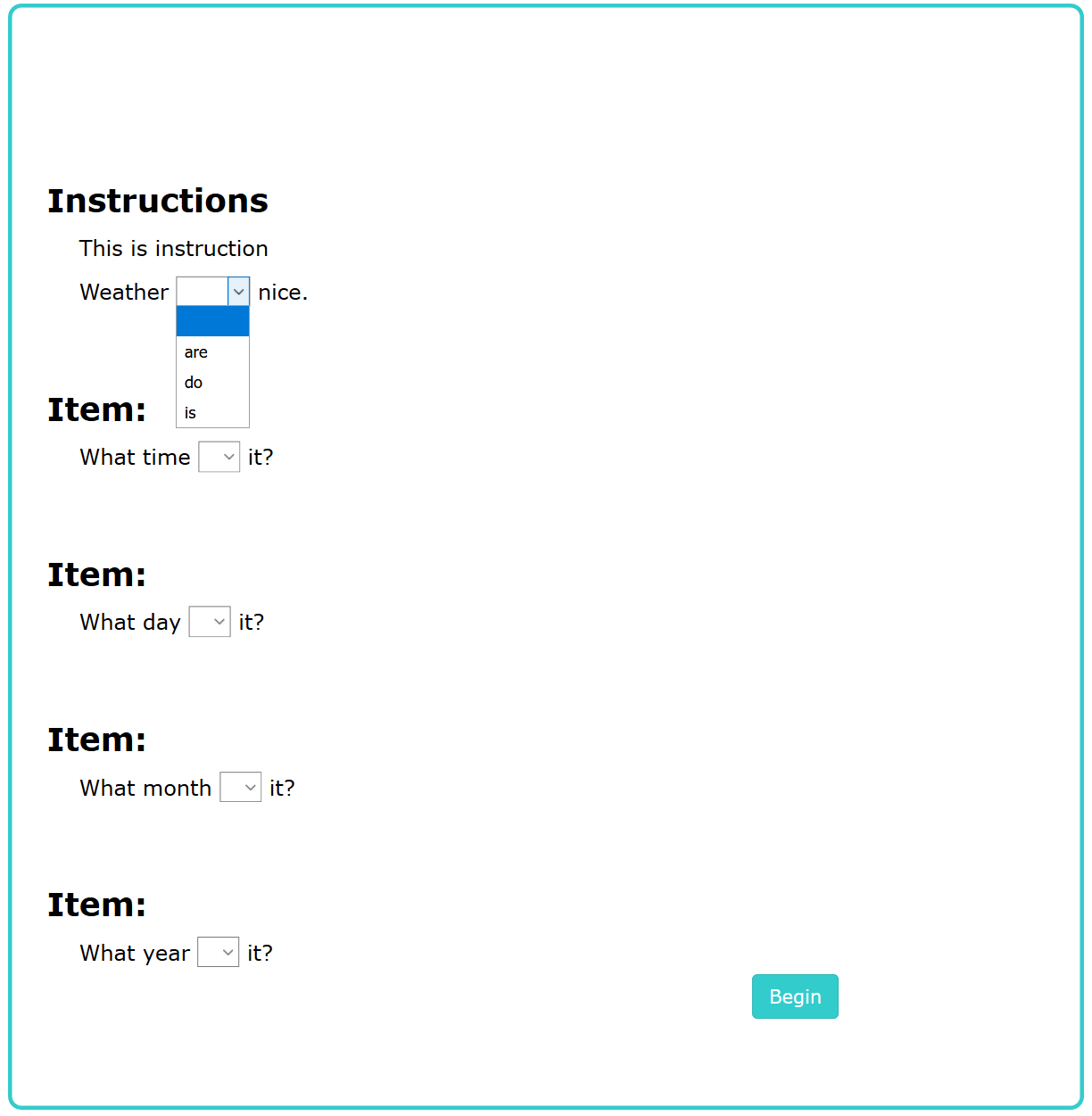
The feedback block should contain the following information:
- Set the task to advance to the
task2document after completion. The test folder already contains a document namedtask2.
- Set the task to be completed when the participant answers correctly
3times in row. - Set following dropdown options to all question items :
are,is,do,has. - Set the
isoption to be the correct choice for all the question items. - Set "
You answered correct!"to be the feedback of the choiceisfor all question items.
- Set five feedback levels to all the other dropdown options of all question items as the following:
- The first level feedback uses bold and is the following: "Feedback level 1".
- The second level feedback uses underline and is the following: "Feedback level 2".
- The third level feedback uses color red and is the following: "Feedback level 3".
- The fourth level feedback should refer participants answer.
- The fifth level feedback should refer first word of the answer.
Assignment 1.2 Answer the questions asked by the observer.
5.2 Creating Task Drag&drop Items
The task is created in the blank TIM document specified by the test session observer.
Assignment 2.1 Create following task containing an instruction block, three question item blocks and a feedback block.
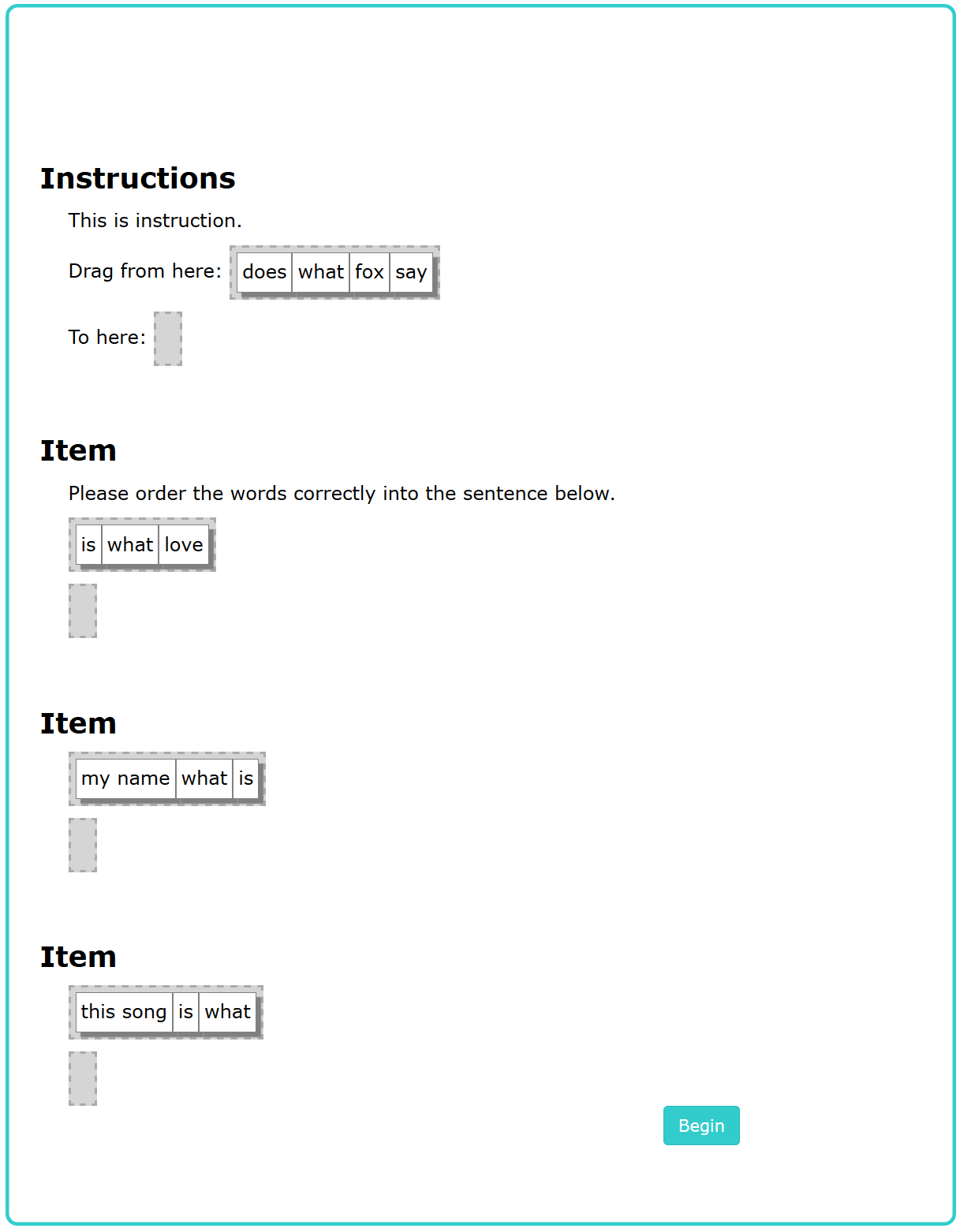
The feedback block should contain the following information:
- Set the task to advance to the
task2document after completion. The test folder already contains a document namedtask2. - Set the task to be completed when the participant answers correctly
3times in row. - Set
what is lovechoice to be the correct choice for the first question item. - Set
answer was correct!to be the feedback of the choicewhat is love. - Set
what my name ischoice to be the correct choice of the second question item. - Set
answer was correct!to be the feedback of the choicewhat my name is. - Set
what is this songchoice to be the correct choice of the third question item. - Set
answer was correct!to be the feedback of the choicewhat is this song. - Set five feedback levels to all the the other dragdrop options of all question items as the following:
- The first level feedback uses bold and is the following: "Feedback level 1".
- The second level feedback uses underline and is the following: "Feedback level 2".
- The third level feedback uses color red and is the following: "Feedback level 3".
- The fourth level feedback should refer participants answer.
- The fifth level feedback should refer first word of the answer.
Assignment 2.2 Answer the questions asked by the observer.
5.3 Answering a Test
For the assignment, the observer has created the test with adaptive feedback beforehand and will give the link at start of the assignment.
Assignment 3.1 Answer the test given by the observer. Pay attention to visuals while answering.
Assignment 3.2 Answer the questions asked by the observer.
5.4 Creating a Report
For the assignment, the observer has created the test with adaptive feedback beforehand. At the start of the assignment the observer will open the folder containing the test.
Assignment 4.1 Make a report of whole test from the answers of the person indicated by the observer.
Assignment 4.2 Transfer the information of the report to an Excel file.
Assignment 4.3 Answer the questions asked by the observer.
References
[1] Hanna Alatalo, Jarkko Kuivanen, Elisa Nauha, Jere Ojala and Kimmo Urtamo. Project Plan of the TIMCAN Project. https://tim.jyu.fi/view/kurssit/tie/proj/2019/timcan/ dokumentit/projektisuunnitelma_timcan. University of Jyväskylä, Faculty of Information Technology. 2019.
[2] Hanna Alatalo, Jarkko Kuivanen, Elisa Nauha, Jere Ojala and Kimmo Urtamo. Requirement Specification Document for the TIMCAN Project. https://tim.jyu.fi/view/kurssit/tie/proj/ 2019/timcan/dokumentit/requirement_specification. University of Jyväskylä, Faculty of Information Technology. 2019.
[3] Hanna Alatalo, Jarkko Kuivanen, Elisa Nauha, Jere Ojala and Kimmo Urtamo. User Manual for Dynamic Assesment. https://tim.jyu.fi/view/kurssit/tie/proj/2019/timcan/ kayttoohjeet/instructions. University of Jyväskylä, Faculty of Information Technology. 2019.
[4] Hanna Alatalo, Jarkko Kuivanen, Elisa Nauha, Jere Ojala and Kimmo Urtamo. Report Template for Usability Testing in the TIMCAN Project. https://tim.jyu.fi/view/kurssit/tie/proj/ 2019/timcan/dokumentit/testaus/kaytettavyystestaus_raporttipohja. University of Jyväskylä, Faculty of Information Technology. 2019.
These are the current permissions for this document; please modify if needed. You can always modify these permissions from the manage page.