TIES327 free discussion area
Last year, the chat went into full disaster mode very quick, to avoid this, please follow the instructions.
Instructions:
- If you want to answer to someone's question, please write a comment for that specific message similarly to the way we do on tutorial pages: click on that post to get the edit-menu, select "Comment/note", enter your comment, and click "Save".
- If you just want to ask a question in one of the existing topics, click "Add message" in the corresponding topic, enter your message and click "Save".
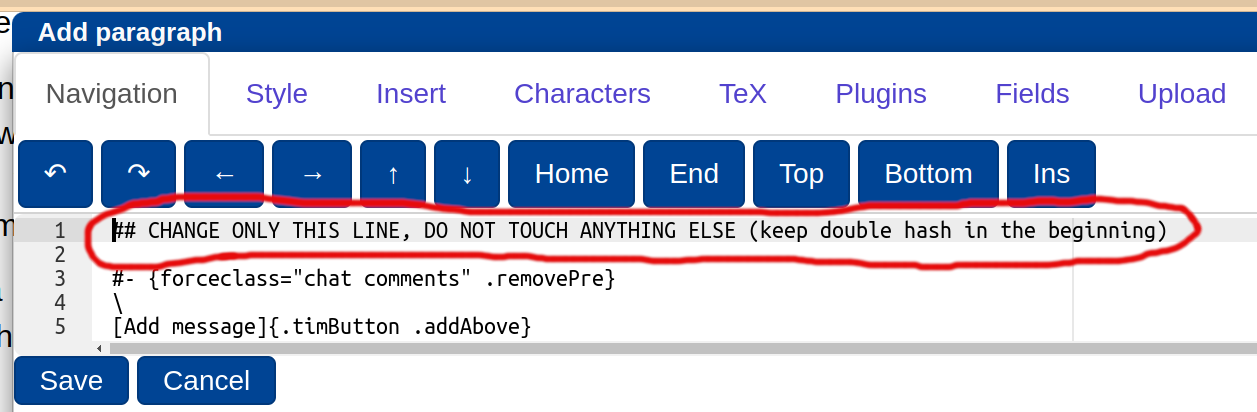
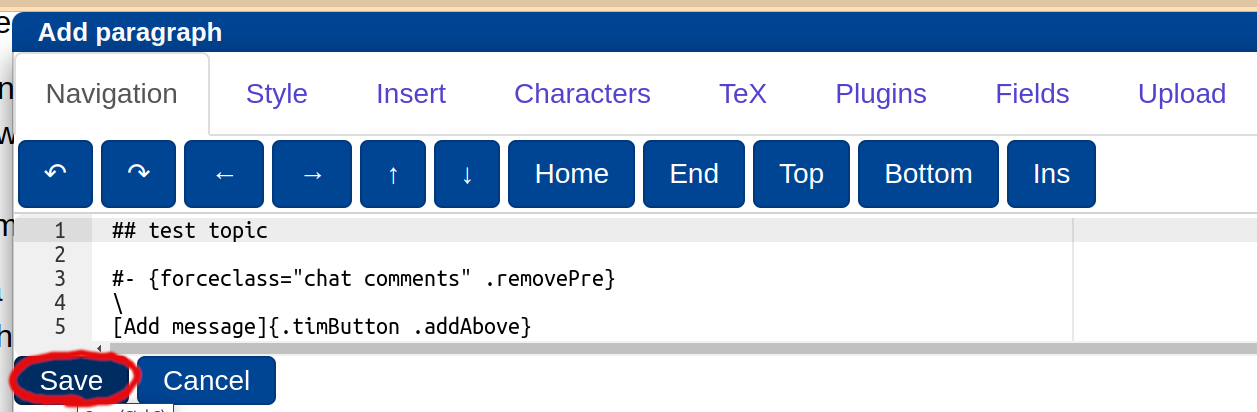
- If such topic does not exist, you can create it with "Add new disscussion topic" button, substitute line "CHANGE ONLY THIS LINE..." with your topic title and click Save. Then add a message with your question in the topic you have just created as described above. See screenshots below for more details.
If you want to get notifications for this page by email go to https://tim.jyu.fi/manage/508476 and edit "Notifications" section.
1. FAQ (this topic will be updated by teachers manually).
I do not have an Internet connection on one of my VMs. How can I fix this?
First, check that you have the Internet connection on your host machine (real computer where you run VirtualBox).
In the first 8 assignments, VMs go to the Internet through your pfSense gateway, which means that the gateway VM should be always up and running when you do the exercises. Also check that you have access to the Internet from the pfSesne gateway by pinging some external web sites.
If everything above works fine, try to ping your pfSense gateway from the VM where you have connection problems: "ping 192.168.10.1" ("ping 192.168.11.1" for VMs in OPT1 and "ping 192.168.12.1" for VMs in OPT2). If this does not work, then you configured your network interfaces incorrectly, check once again network interface configuration file on your VM and how it is supposed to be configured in the corresponding section of the tutorial
Check "Settings -> Network" of the VM which has problems in VirtualBox. In particular, double-check that intenal network adapter names of different VMs correspond to each other, e.g. Alice's network name should be exactly the same as the gateway's second network name, etc. Students who work on one of the course's dedicated servers often forget to modify the network name in both places, e.g. they change the name of the gateway's network from "lan" to "lan_username", while the name of Alice's network remains "lan", or vice versa. They should be identical!
If you can ping the gateway from your VM, try to ping some external web site, e.g. "ping google.fi". If this does not work, try to ping Google’s server 8.8.8.8. If "ping 8.8.8.8" works, but "ping google.fi" does not, then the problem is in DNS servers you use. For example, you cannot use 130.234.4.30 and 130.234.5.30 if you are not in JYU network, use the DNS servers that you use in your home network, or simply google's DNS servers 8.8.8.8 and/or 8.8.4.4. If you cannot ping 8.8.8.8 then type "route" in the terminal of the VM and check that gateway IP 192.168.10.1 (for OPT1 network it is 192.168.11.1 and for OPT2 - 192.168.12.1) is the default gateway. In tutorials 4-8, the dnsserv-VM is used as the DNS server, so it should be up and running all the time. Also, double check that it has been configurred properly.
Check firewall rules added to pfSense for the corresponding interface if there are any. Make sure that there is no rule blocking the networking and that there is actually a rule that allows the traffic.
2. Looking for a group!
Hi, I am not looking for a group, this is just a test message, but you can look for teammates by adding a new message in this topic!
test comment
—Is there any chance I could join some group? I would really appreciate mindstorming and some help with the assignments.
Add message
3. Connecting to faculty servers?
I tried connecting via ssh to the tieskybs01 and 08 servers as instructed in the first tutorial, but the servers tell me "Permission denied, please try again." Other servers, like Halava let me in. I'm using Windows 10 built-in SSH client, if that matters
Hi, the servers should be working. "Permission denied" most likely means you do not have an account created. There are 14 students without JYUNET accounts, I assume you are one of these students. Accounts for these students to the servers should be created manually by admins of the servers. Send an email to Timo and/or Juhani, they will make you an account.
—Another option: the accounts have not been added yet. Can anyone check and confirm that you can connect to the servers?
—Yes connection works for me.
thanks!
—Saturday, 9.09: none of the servers can be accessed, we have informed the admins.
The servers are back online.
—I get permission denied also. I have already sent an e-mail to Timo on saturday but no reply yet. Can't find Juhani's e-mail address anywhere. Could someone add me an account to the servers, please.
please send an email to Timo again, he has probably missed it
—My kali and gateway vms suddenly aborted, and now when i try to connect with putty it gives the next error
Could not chdir to home directory /home/käyttäjänimi: Input/output error /usr/bin/xauth: error in locking authority file /home/käyttäjänimi/.Xauthority -bash: /home/käyttäjänimi/.bash_profile: Input/output error
Same here.
—Same problem here.
—When trying to ssh tunnel I'm getting
"ssh: connect to host tieskybs0X.it.jyu.fi port 22: Connection timed out"
as of today (Sep 13th) 8 AM Finnish time, for at least X = 1, 2 or 3. Was working yesterday, I don't think I changed any firewall etc. settings in the interim. Please let me know if it's just me :)
Same here!
—Same message from all servers.....
—Servers are down again! They are expected to get online later today.
Deadlines will be extended, do not worry!
Hi! I tried to connect to the server but this time I received a following error message: ssh: connect to host tieskybs03.it.jyu.fi port 22: No route to host
Was the problem really fixed today?
Servers are up! Sorry for inconvenience, the deadlines are extended by 4 days.
Hi, now Putty works fine, but when trying to connect with Tiger VNC it says "This connection is not secure" and asks for a password. Then I get a message saying:
"An unexpected error occurred when communicating with the server: Authentication failure: No password configured for VNC Auth". This was working perfectly fine before the servers went down and I could connect straight away with it, is there anything I could do or does this have something to do with the servers? I've tried with servers 2, 6 and 7 multiple times.
Hi, make sure, that all the necessary boxes are checked in the VNC client (see screen below), it works for me at least with the 2-nd server.
—VNC security: 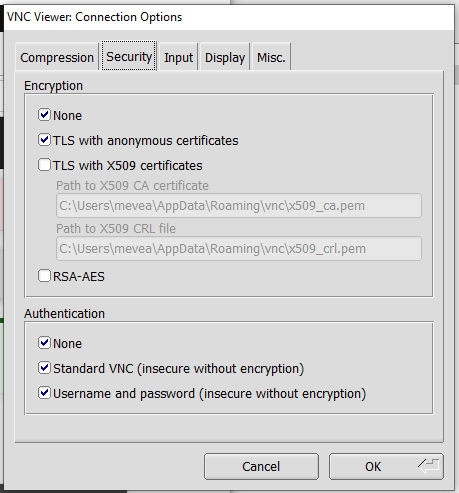
I checked, I have all the necessary boxes checked and I still get the same error messages. Should I download it again, does this affect the other systems?
—Hm, strange. I would double-check configurations in putty, try without putty, try from another pc. I mean it works for me and all the students (I guess), so it must be something on your side...
—You can also try to reinstall the vnc client as you suggested
—If nothing helps, send me an email with a screenshot of the error, I will forward it to the servers' admins, maybe there is indeed something with the servers if you say it has worked before
—Ok thank you, I'll give it a try and get back to you by email if it doesn't work.
—Hello! I have a strange problem. When I am trying to log into the CentOS in TigerVNC via my JYU credentials, it's just repeat username and password window endless times. I have been working with it today, and everything was fine, but now smth went wrong. What can the problem be with? upd: It's working fine now. I just waited overnight.
I had the same problem. Noticed that my laptop switched to another wifi network and that was the time when the problem occurred. Might have something to do with that or not... Anyway, disabling the other wifi (range extender) and rebooting my machine seemed to fix it.
—There can be problems if you close the connection incorrectly, e.g. close the tunnel before VNC or something like that; yes, you just need to wait for the connection timeout; it can be 15 mins, do not remember the exact number
—Hi, if you have a problem similar to the one reported by Daniela ("This connection is not secure" in the VNC client), please send us an email. Some of your local files and/or directories can get "broken" / deleted on the servers due to that servers' shutdown last week.
If I undestood correctly, it could happen if you were using / tried to login to the server at the exact moment of the shutdown. 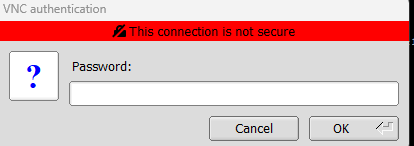
Still having this same problem described on earlier discussion: When trying to ssh tunnel I'm getting
"ssh: connect to host tieskybs0X.it.jyu.fi port 22: Connection timed out" The same problem on all servers....
From where are you trying to connect?
Go to https://whatismyipaddress.com/ and send us your IP by email.
—Sent to Timo
Server down again? Trying to SSH into tieskybs01 seems to timeout:
osklahti@tieskybs01.it.jyu.fi's password:
debug3: send packet: type 50
debug2: we sent a password packet, wait for reply
Connection closed by 130.234.173.20 port 22All 8 servers seem to be down.
JYU server log in fails
When connecting to JYU server 5, GUI opens after Putty connection, asks for user name and Password but after that returns back to asking username with no error messages
If there are problems with the servers, send an email directly to Timo and Juhani (if you have his email), I do not think they open this chat frequently (especially the topic somewhere in the middle). I can't help you with these issues, because I do not either control the servers or have sudo privileges there.
Add message
4. Assignment 1 and 6 OpenSSL commands
I have issue with TIM not accepting the 6 OpenSSL commands. Quite sure that the commands are correct. TIM just states that there are not enough commands, so some issue with how it needs to be entered.
Anyone else with same issue? Afraid to make too many tries as there is a limit.
Hi, yes they are correct, but you should separate the commands from each other with an empty line!
—Thanks! Works now. Maybe a note to others too, remember to have those empty lines (esp. when copying from terminal).
Great! Also always double-check that you have answered all the questions; in some assignments, e.g. the one about pentesting, there are many questions, so it is easy to miss one or two.
—Hello, our answer to the OpenSSL commands -exercise says "Certificate request self-signature ok", but we are still getting 0 points. Any tips on what is wrong with our answer?
sure, tip: your server's certificate signing request should be signed by the ca
—
Add message
5. Assignment 1: Additional firewall rules
Hi, there are a couple of confusing things about this exercise. Firstly, the exercise states that 6 new rules should be added, but only 5 ports are listed. Is the sixth rule intended to be the one tha blocks all other traffic?
Another question; even though we didn't manage to successfully block all ports, we wanted to see if the answer checker script could give us any hints. It states: "Cannot find the rule that allows all IPv4 traffic from OPT2!", however, we have a rule in place that allows all traffic from OTP2 to "any" over IPv4, with no specific port specified. Is this not sufficient?
Hi, I have checked your answer. You have a lot of mistakes, therefore 0 points so far. Plese test the rules in the network before trying to submit them into the answer box. I have added the commands you can use for this purpose.
Concerning the grading script, the log message was a bit misleading because in your case there are too many "pass any IPv4" rules, but it should be only 1. I have updated the message.
—Hi! I have same situation as the second commenter. My rules pass all the tests but I get 0.1 points.
What comes to your tip above as far as I understand I have that part correct..? If you can take a look I'd appreciate it!
Hi, exactly the same problem as Timo has: in the assignment you are asked to write rules for the webserv-VM, not entire OPT1 subnet.
That what I meant in my tip above: if there were other servers, then your rule would affect those as well, which is not what is asked. This is not a big deal of course because there is (and will be throughout the course) only one web server, but the grading script does not like that :) so please change the subnet range to the exact ip
—
Add message
6. Points and credits site
How often does the site /points update? I'm guessing there's some sort of an update interval that does not get triggered by user submits to the questions.
we'll update every Monday morning, and maybe some time in the middle of the week
—
Add message
7. Assignment scoring
Are assignments scored by the last or by the best scored attempt? It seems like the last one will be accounted for.
last one
—
Add message
8. Continuing the course from previous year
I did 3 ECTS's worth last year and I'm now planning to do rest of the course.
All tutorials from 9 to 16 seem to require that you have Alice, Bob, Gateway and other parts of the virtual network in place.
I'd rather not built the network again from scratch going through all the motions again. Is there a way to use the virtual network I built last year?
just use the old ones, edit them according to the instructions in the tutorials
—
Add message
9. Kalin latauksessa E_INVALID ARG
Importtasin Gatewayn, Alicen, Webservin ja Bobin VirtualBoxiin ilman ongelmia. Kun importtasin Kalin, tuli viesti RESULT CODE E_INVALID ARG (0X80070057). Googlettamalla tätä virhekoodia löytyy paljon linkkejä samaan ongelmaan. Miten korjaan?
insufficient space on the hard drive?
—Same problem here. I downloaded the .ova files to a course server computer and importing alice to VB gave me the same error code.
which server? I have just tested on server 1 by importing alice and kali, absolutely no problem at all
Are you sure the download has been completed?
—Commented too quickly, didn't have this problem with importing Kali but the error code is the same
Add message
10. Kirjautuessa koulun koneelle tulee viesti "Could not chdir to home directory"
Onnistuin kirjautumaan koulun koneelle TigerVNC:n kautta. Yritin ladata yhden virtuaalikoneista tälle koulun koneelle. Lataus meni loppuun asti, mutta sitten ilmoitti tilakseen "Failed". Yritin käynnistää toisen virtuaalikoneen latausta useampaankin kertaan. Lataus ei alkanut. Pian tämän jälkeen Firefox ei enää toiminut koulun koneella. Muutenkin ilmeni asioita, joiden perusteella vaikutti, ettei kone enää tunnistanut käyttäjääni. Suljin TigerVNCn kautta auenneen näkymän ja yritin avata sen uudestaan. Nyt TigerVNC sulkeutuu joka kerta kun ensin suostuu ottamaan vastaan käyttäjätunnuksen ja salasanan ja näyttää viestin, jonka persteella kirjautuminen on onnistunut. Yritin sulkea powershellistä koko ssh yhteyden ja käynnistää sen uudestaan, mutta seurauksena on viesti:
"Could not chdir to home directory /home/[kayttajanimi]: Input/output error -bash: /home/[kayttajanimi]/.bash_profile: Input/output error"
Mikähän tässä eteen?
Same here. Yesterday evening worked fine at least with the 08 server. Now it seems that the problem is the same with all the servers, getting this input/output error.
Sama ongelma täällä, eli ssh-yhteys ei onnistu, tulee tuo virheilmoitus.
Add message
11. When Starting my Gatewy V-M I get this Error "Can't find /boot/zfsloader"
I have setup all my Virtual Machine and they work as expected but sddenly I cant start it anymore. When I rebooted the Gateway machine I'm presented with this error. "Can't find /boot/zfsloader"
If you are using the course's servers then there are bigger problems currently...
If it's you own pc, then I would recommend just to reimport the VM. Also check that you have enough hard drive space, because it looks like there is a problem with the VM disk file. Also, when you shutdown VMs, use normal shutdown from the VM itself, not "power off the machine".
—
Add message
12. Assignment 1: 4.1 Configuring access via HTTPS
When I'm trying to download this http://student:Ties327_2023@users.jyu.fi/%7Emizolotu/teaching/files/ca_ties327.pem file with wget, I'm getting error "401 Unauthorized", "These files are only for the course students". Few days ago it worked fine to download files from there when I completed auxiliary tutorials. Why don't I have access anymore to these files?
Never mind, I had a typo there. It works now.
Add message
13. Still unable to connect to internet via Gateway VM
Running latest Virtualbox on Windows 11 on my own laptop. I'm using the ready made VMs which are imported to Virtualbox via the provided .ova-files. Gateway VM runs and I'm able to reach "outside world" via that VM using ping. No settings are changed from the provided .ova-files. Unfortunately I'm unable to reach the outside world via the other VMs (tried alice, bob and webserv). Ping only gives "network is unreachable" message (8.8.8.8 as well as the default ip address for the lan interface). The network configuration files are unmodified, only imported. Also the network names in Virtualbox are unchanged. Checking ifconfig for alice shows that no ipv4 ip address is assigned and there is no default gateway, but I guess this is normal if there actually is no connection between the two VMs and Alice can't reach the DHCP service of the Gateway VM? Any suggestions?
Hi, one student had exactly the same problem: no connection between the gateway and other VMs: alice, bob, etc. As a result Alice will not have an IP address and the network is unavailble obviously. No solution has been yet found.
It is hard for me to say, but it is likely not the VM's fault, but something is with the VBox on your PC. I have just tested it on Win11, everything is working.
I am just wondering if the NAT network works, but the internal does not, can there be anything that blocks it, some firewall or antivirus or something else?
I would also try to perform some basic test: create two VMs, e.g. use your test-VM from the intro and clone it, on both VMs change network adapter to internal with some name, e.g. "testnet", change netplan settings on both VMs so that IP is assigned "statically" (see e.g. here how to do it) and check if there is network connection between those VMs.
—Just to make sure: run "sudo netplan apply" on alice-VM with the gw running, because there is a possiblity that alice-VM simply starts before the gw, then there might be no IP address on alice... Hopefully you made sure that this is not your case.
—I would also try to change IP address from 192.168.10.0/24 to something like 10.0.10.0/24, maybe it does not like this particular IP range...
As I mentioned above, it is hard to say what is the issue, because I cannot repeat this problem on any of available to me PCs.
If you cannot solve the problem, you can start using the course's servers... when they are back online
—Interestingly enough changing the lan IP address from 192.168.10.1 to 10.0.10.1 works. DNS still fails but at least there is some hope (and somebody else with the same problem)
Fixed this with adding the nameservers to netplan config file. See below.
—Can you please test: edit DNS back to the original one, i.e. via dhcp, and reboot gw, it should fix the DNS problem, I had exactly the same problem after changing LAN ip address
—Following works: 1. On Alice comment out the manually added DNS from network manager config 2. Restart GW 3. On Alice: 'sudo dhclient -r enp0s3' and 'sudo dhclient enp0s3' 4. On Alice: resolvectl shows only 10.0.10.1 as the DNS address but now it works
—Thanks, can also run: "sudo netplan apply" on alice-VM, it should also work to get the ip
—
Add message
14. Bob and Alice DNS malfunction with Gateway
My default nameserver doesn't work. IP pings ok, but for example google.fi doesn't. I managed to fix the problem with Kali, but the problem is still present with Bob and Alice. My temporary fix is to modify /etc/resolv.conf manually by adding a valid nameserver. Problem doesn't occur when machines are directly connected to the net by NAT, but once data goes through gateway, the DNS gets messed up (no visible change within the files). On Bob or Alice, resolv.conf cannot be made immeuble. Any help here?
What step of the tutorial? Does gw can ping google.fi? File /etc/resolv.conf is automatically generated, you should not edit that. Change all settings back to the original ones, run "resolvectl" in alice's terminal, what is the DNS ip?
—For me the gateway DHCP either provides a wrong DNS server address or doesn't provide one at all and ubuntu defaults to the ip-address. Check https://vegastack.com/tutorials/how-to-set-dns-nameservers-on-ubuntu-22-04/ and edit the /etc/netplan/01-network-manager-all.yaml accordingly. At least worked for me.
—Try to reboot gw, if it does not help, you can set DNS manually on alice and bob as described in the link provided by Mikko, but please let their ips be obtained via dhcp, because there will be dhcp attacks in one of the future tutorials, and they obviously will not work if your clients receive ip "statically"
—If you have this problem, configuring static IP is not a good idea, because we will need DNS and DHCP working in future tutorials.
Check that your home router's IP/DNS does not overlap with our virtual subnets, i.e. it is not one of 192.168.10.1, 192.168.11.1 and 192.168.12.1.
Try also to change IP of LAN subnet in the gateway from 192.168.10.1 to 10.0.10.1 for example, I can provide exact instructions how to do it if needed.
If nothing helps, I recommned to use the course's servers.
Thanks guys, adding the nameservers to ../01-network-manager-all.yaml seemed to do the trick (I left the DHCP on). First I tried to change LAN subnet IP, but in this occasion, that didn't help. You people are super, and now all my machines appear to be fully operational.
Add message
15. Assistance needed with assignment 1 part 7.2
I don't understand what to change in the answers for the assignment 7.2... I have made the firewall rules and they block traffic from seemingly the correct source and destination. I have separated the lines also. Similarly, I don't have any clue on how to continue, when my selfmade certificate doesn't work. After changing it as the certificate in use, I tried to open the pfsense page. It shows the page as insecure ("Did Not Connect: Potential Security Issue"), yet my selfmade certificate is shown as the certificate in use (Advanced -> View Certificate -> [my self made certificate is shown]).
You should be able connect to your pfsense web gui by usinbg the IP address, i.e. just go to: https://192.168.10.1 and accept the risk (I remember I have mentioned aabout this issue in the tutorial just for this purpose!)
Then you can try to recreate your certificate, you forgot one important thing
—Your fw rules are almost correct, but please read what is said in the tutorial about the rule order!
Edit: your fw rules have nothing to do with the certificate being faulty, so these are two distinct issues
—Thank you! I managed to fix the problem with the firewall rules with this advice. The problem with the certificate was more troublesome, but in the end I managed to find a solution that seemed to work. Although I'm not sure if it was an "orthodox" solution, since it involved creating a new .pem file with gedit, which seems like a bit hard way to accomplish this assignment. Hopefully this answer goes through in TIM's checker!
could someone please tell how to copy the output pfctl -sr... on Gateway SSH?
select, right click, copy?
—
Add message
16. Hydra attack assignment 2 part 4.3
I have tried many times to get the Hydra attack phrase to work. It always gets "all" passwords. So yes something is wrong in the attack phrase.
Tried to troubleshoot with burpsuite and tested many different versions of the attach phrase.
Any possibility for more tips? Maybe something small is incorrect...
I can give tips, but you need to submit your current answer (at least some), otherwise it is hard to tell
—Thanks! I have submitted my Hydra attach phrase (one of many iterations). TIM does give some points, so it is not completely off :) Which way to look to get it right?
Hi, check method, url and cookie, basically everything looks incorrect :) the "incorrect login" phrase is probably the only thing that looks fine...
—
Add message
17. webserv not starting properly in university server
In university server, webserv is started in 5.4 while gateway in running. When is start webserv, it gets stuck in login. I removed webserv and imported a new webserv, same result. Ubuntu 22.04.2. LTS webserv tty 1. webserv login: writes 4 lines of Cloud-init. Last is [ 51.350704] cloud-init[908] 2023-09-16 12:32:05,447 - cc_final_message.py[WARNING]: Used fallback datasource After that does not take commands, ctrl+c +x, +z do not help How to solve this?
In Virtual Network Configuration, I removed all machines and imported them again. Configured carefully according to instructions and advanced until strating gateway. Webserv stopped with the same WARNING-message as before, no change. It tried to be fast and sign in manually. I typed username with enter, but after that webserv did not wait for password, but instead run commands to that same WARNING. I really don't know what to do, since redoing all did not help, and time is running ou. I have already used a week trying to configure. Please advice.
Did you try typing the username and password in and pressing Enter, ignoring the messages? I have the webserv print some messages before signing in but I could still sign in, the prompt just looks cluttered. I'd assume C-z etc. don't work before logging in either way.
—If it looks like on the screen below, then as Oskari said, just hit Enter a couple of times and enter webserv's credentials... 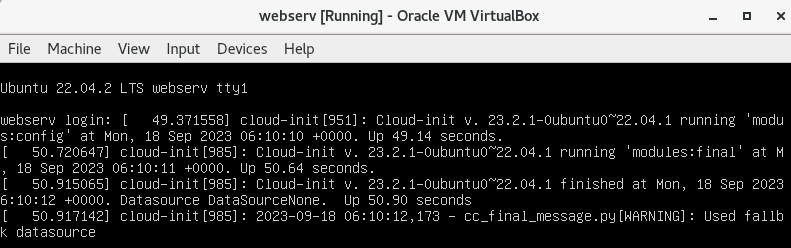
Thanks! I added login and password, ignoring messages, and it solved the problem.
Add message
18. Kali Linux pentesting 3.1 nmap - cannot find host 192.168.11.2
When I tried to start this assignment using the nmap I received following info:
└─$ nmap 192.168.11.2 Starting Nmap 7.94 ( https://nmap.org ) at 2023-09-17 22:08 EEST Note: Host seems down. If it is really up, but blocking our ping probes, try -Pn Nmap done: 1 IP address (0 hosts up) scanned in 3.03 seconds
Ping for that IP returns only this: --- 192.168.11.2 ping statistics --- 1293 packets transmitted, 0 received, 100% packet loss, time 1324960ms
Other pings tried work (e.g oogle.fi, 8.8.8.8, 192.168.10.1 etc.)
When scanning 192.168.11.0/24 the result is (I tried this to see if next steps return anything): └─$ sudo nmap -sS 192.168.11.0/24 Starting Nmap 7.94 ( https://nmap.org ) at 2023-09-17 22:14 EEST Nmap scan report for 192.168.11.1 Host is up (0.00063s latency). Not shown: 996 filtered tcp ports (no-response) PORT STATE SERVICE 22/tcp open ssh 53/tcp open domain 80/tcp open http 443/tcp open https
Nmap done: 256 IP addresses (1 host up) scanned in 9.04 seconds
How could I fix this? I cannot continue with assignment before solving this.
is webserv up? can you ping the gateway from the webserv? aren't there any fw rules that block the web server?
—Well, as it often is, now it works. Yes, the webserv was up, yes, it pinged the address. Only Kali did not work. Now it does. Would be wonderful to know what helped as nothing was changed, except that I asked about it here. :D
Add message
19. Problem with points in Kali pentesting, Attack countermeasures
I got 1 point from this earlier, but after I had had problems logging in some other points on sunday night, my points have changed to 0.9999999999.
No idea why it is like that in some questions, and in some it is ok even though they are very similar...
If this affects your grade when you complete the course, please let us know
—I think there are many where the points are not rounded up correctly.
Maybe TIM had an update which changed things? I also noticed this ealier.
Add message
20. Msfconsole command not working
In Reverse TCP part 4, subpart 12: When I insert the command msfconsole, I get this error message (and a whole bunch of other stuff after it...): "
:98:in `open': Permission denied @ dir_initialize - /usr/lib/ssl/private (Errno::EACCES) ". If I put "sudo msfconsole" nothing happens, I just get stuck waiting for some kind of response in the terminal...Hard to tell... Try rebooting kali, reinstalling msfconolse; re-init msf db. Also was you able to run msfconsole in the previous tutorial?
—In addition: I also tried the same command in root (i.e moving into root mode with sudo -s first), but this also just resulted in a lot of waiting to no avail.
but in the tutorial there are no such instructions...
—True, but since it didn't work, I guess I had to start trying work arounds. Since the error message seemed to be about lacking privileges, I gathered (and read from other sources) that being root could help.
Rebooting Kali seemed to work (I tried a fix from https://github.com/rapid7/metasploit-framework/issues/8956, which included apt upgrade and some msf reinstallation, but it didn't work - at least without rebooting). Thank you for the tip!
I had this same issue, and IIRC found out that the issue existed when I tried to launch msfconsole while on non-home/default directory, in this case, the root directory, which seems to have been the case here too.
Add message
21. 4. DNS tunneling - DNS server configuration problem.
paragraph 5. When adding the requested items to the ...00-installer-config.yaml file, the following command "sudo netplan apply" does not work, at least for me
Gives an error message "...00-installer-config.yaml:7:1 error in network definition: unknown key 'addresses' addresses: [192.168.10.2/24] ^ I have booted, re-downloaded and tried to write those instructions in different ways and nothing seems to help. Probably another simple thing, but I just don't get it...
typo?
—there was a check there too, plus it required the indentations to be completely correct...
Add message
22. Secure Connection Failed while connecting to https://192.168.12.2/ with Bob
I started the msfconsole with kali, but when attempting to open the attack page with bob, firefox didn't allow to enter the page and presented a message "Secure Connection Failed"...
Please, just follow the instructions carefully. These commands have been tested one million times and unless there is something out of ordinary they should run without problems if you just copy-paste the commands to the terminal, browser, etc.
If you have a problem when running a command, you should first double-check maybe you have made a mistake / typo in the command.
—Sama ongelma minulla
Oops. Accidental finnish. Anyway, I have a similar problem.
—Thank you again. I used copy paste for everything and did everything (pertaining to the assignment in question) again from scratch, and for some reason it worked now. No idea why, but it worked, so thank you!
Add message
23. Clam AV download problem in Reverse TCP exercise
Paragraph 5.5-5.10. introduces the download and use of Clam AV. I'm not able to download it, is Clam AV loading working for others?
sudo apt update?
—sudo apt update did not help
Do you have the Internet connection on bob?
What is the step exactly where it does not work?
What command do you enter and what is the result?
—Now it works.
(:
—
Add message
24. Answers for the first set of assignments
Add message
25. Assignment 11. 5.3 Advanced OPT2 IPv6 rules
Tried to work with the opt2 rules and puzzled where the issue might be. Any hints where the issue might be on the submitted rules?
- use global scope ips
- order
Your latest rules are correct, but the order is completely off.
For example, your "block other traffic to pfsense" rule is above "allow https for bob to pfsense" rule. Therefore, for any https packet that comes from bob to pfsense, this "block" rule is executed first and the "allow" rule is ignored. That is how pfsense rules work: rules are checked from top to bottom, and if there is a match, the rest is ignored, something like this:
for rule in rules:
  if rule_matches:
     do_something, i.e. pass or block
breakI have same problem, really puzzled when I get 0/1.6 pts but with nmap everything seems to be fine (for example ssh only allowed from bob). Any hints?
Check section 3, step 9. This "pass all" rule should be present, positions of other rules are calculated based on this baseline rule.
Ok, this post is 2 weeks old, I did not notice in time :(
—
Add message
26. Assignment 4 part 4 DNS Tunneling
Tried to open a DNS tunnel with bob as instructed, but iodine replies with NXDOMAIN. iodinine sends the DNS queries to 127.0.0.53, and my nslookup looks like this:
Server: 127.0.0.53 Address: 127.0.0.53#53
Non-authoritative answer: Name: kali.ties327another.jyu.fi Address: 192.168.12.2
and my resolvectl looks like this:
Global Protocols: -LLMNR -mDNS -DNSOverTLS DNSSEC=no/unsupported resolv.conf mode: stub
Link 2 (enp0s3) Current Scopes: DNS Protocols: +DefaultRoute +LLMNR -mDNS -DNSOverTLS DNSSEC=no/unsupported Current DNS Server: 192.168.10.2 DNS Servers: 192.168.10.2 DNS Domain: home.arpa
I have already checked all of the configuration files, and they should all be ok. do i need to change the 127.0.0.53 server to the kali ip address somehow?
EDIT: i got it to connect by giving the ip address of the attacker in the command as follows: sudo iodine -f -P 12345 -r 192.168.12.2 kali.ties327another.jyu.fi is this fix enough, or do i still need to change the server 127.0.0.53?
not sure why it was not working as instructed, good that it works now
127.0.0.53 is something like internal dns of the host you do not need to edit it: https://unix.stackexchange.com/questions/612416/why-does-etc-resolv-conf-point-at-127-0-0-53
—Can somebody check if this method changes the packet captures, i am missing .1 point from the packet capture filter assignment, and can't figure out if im just stupid or if the packets just dont exist.
—Iodine complains about NXDOMAIN even if the tunnel is working, if this is what you mean by "iodine replies with NXDOMAIN" 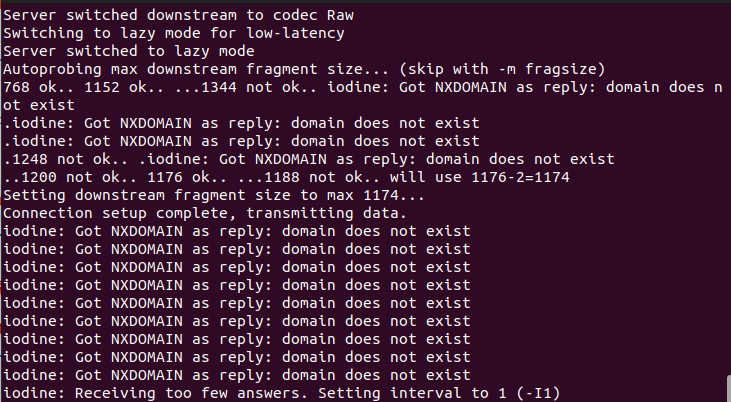
Add message
27. Assistance needed with 6.2 TCP assignment
Hi there, I´m a bit lost how to proceed with the assignemnt 6.2 considering suspicious files. I am not sure what steps I should follow to get feedback regarding the files from Kali. What parts of the tutorial are needed for this? I would appreciate a nudge into right direction.
- use the link provided to separate executables from non-executables
- check each executable with clamav and virustotal to separate benign from malicious
Thank you, this got me on right track. I stucked to thinking this too complicated way.
Add message
28. Hydra not working in signature-based intrusion detection
I have tried using hydra with the command from tutorial: hydra 192.168.11.2 http-form-post "/accounts/loginproc.php:username=USER&password=PASS&Submit=Login:index.php" -t 10 -w 60 -l alice -P password.lst -I
It always results with the same error message: DATA] attacking http-post-form://192.168.11.2:80/accounts/loginproc.php:username=USER&password=PASS&Submit=Login:index.php [STATUS] 10.00 tries/min, 10 tries in 00:01h, 3542 to do in 05:55h, 10 active [ERROR] all children were disabled due too many connection errors 0 of 1 target completed, 0 valid password found Hydra (https://github.com/vanhauser-thc/thc-hydra) finished at 2023-09-26 18:49:36
What could I do to fix this connection error?
Is 192.168.11.2 up? Can you connect to it via browser for example?
—Now I don't have a connection error anymore, but I still have problems with Hydra in the Advanced assignment.
Hydra starts normally, but it only goes through first 53 usernames & passwords because it finds enough correct ones:
[80][http-post-form] host: 192.168.11.2 login: snoop'flower|honey password: ilmarialpinestaneagle1goldfish [80][http-post-form] host: 192.168.11.2 login: gaelic'jordan23 password: ashtonbenoit [80][http-post-form] host: 192.168.11.2 login: 1964/prof'jordan password: taiwantopgunbaraka 1 of 1 target successfully completed, 53 valid passwords found Hydra (https://github.com/vanhauser-thc/thc-hydra) finished at 2023-09-30 16:35:44
It never gets to username Alice and my notice.log remains empty. How can I fix this issue? I used this line as one line to turn on Hydra: hydra 192.168.11.2 http-form-post "/accounts/loginproc.php:username=USER&password=PASS &Submit=Login:index.php" -C sbid_userpass -I
Add message
29. Tips on how to fix dnsserv connection
I am trying to complete the DNS tunneling part and I get stuck to the point 3.7. I have tried to check that the firewall rules are correct, and I have all the needed VM's open (webserv, gateway, alice). I have also double checked the instruction part 3.5. and it should be correct according to my understanding. Do you have any tips on what I could try to do next to fix it? 
What does "ip a" print? Can you ping the gateway from dnsserv-VM? Check that dnsserv-VM's network adapter name in VB Manager is the same as the gw's 2-nd adapter's name.
—The adapters name was only lan in gw, but I changed it to match the one in dnsserv and now it's the same lan_myusername in both, but it didn't solve the problem. Is it necessary to make the advanced tasks in the part virtual network configuration for this part?
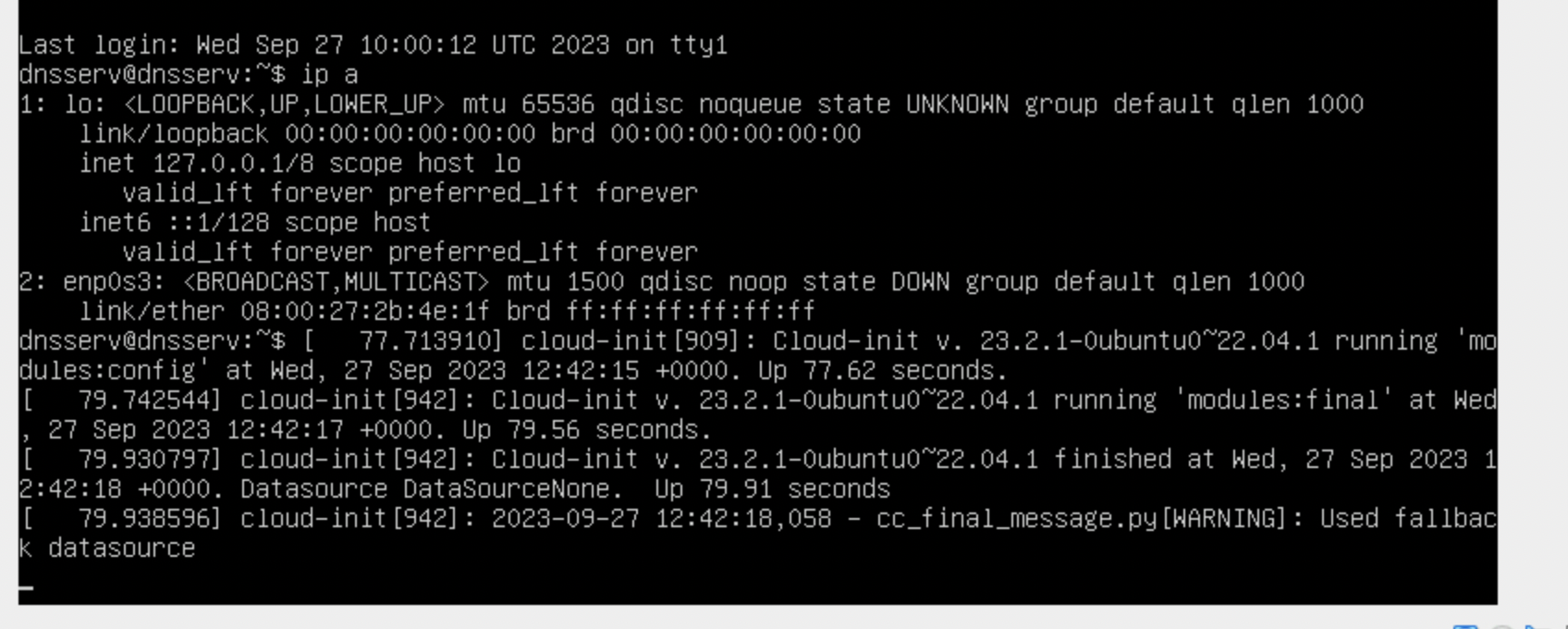
Why the interface is down? :) What happens when you run "sudo netplan apply"? Is there an error or something?
No, the advanced tasks in the 1st tutorial are not necessary for the dns to work.
—Thank you for your help I got it now. :)
Add message
30. Message on the course's servers
All servers will be rebooted at 06.00 every morning from now on. Keep it in mind if you work on the servers during nights :)
Add message
31. Introduction's file loads
When trying to load files intro.txt and keylog_reader.sh the result is Permission denied (own machine's VM)
Change directory to home one:
$ cd
$ wget -O intro.txt http://student:Ties327_2023@users.jyu.fi/%7Emizolotu/teaching/ files/intro.txt
—
Add message
32. Assignment 4 part 3: DNS server not found
I did steps 1-18 in the part 3 and did not see (recognize?) any problems, but alice does not find DNS server. pings work in both alice and dnsserv. Bind9 seems to be running ok (green, active, no reds). Pfsense done. 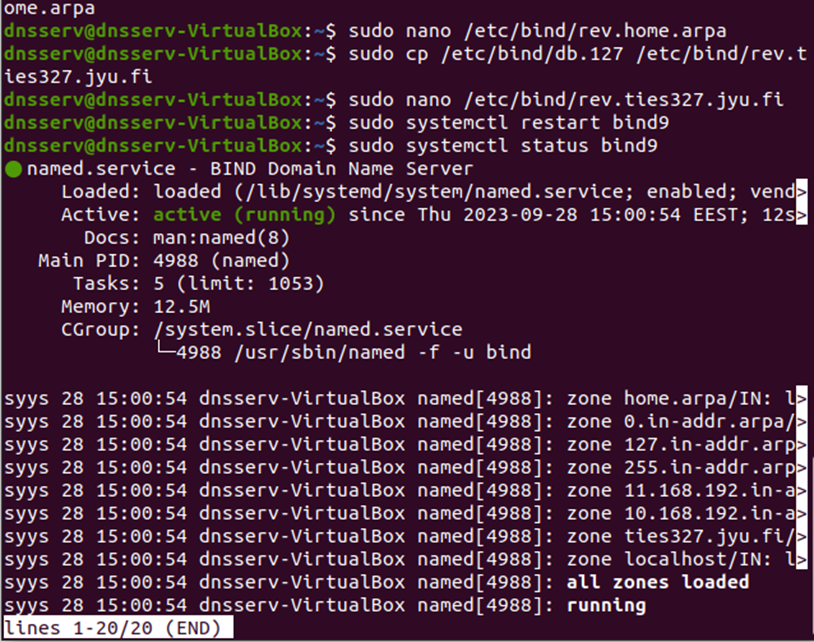
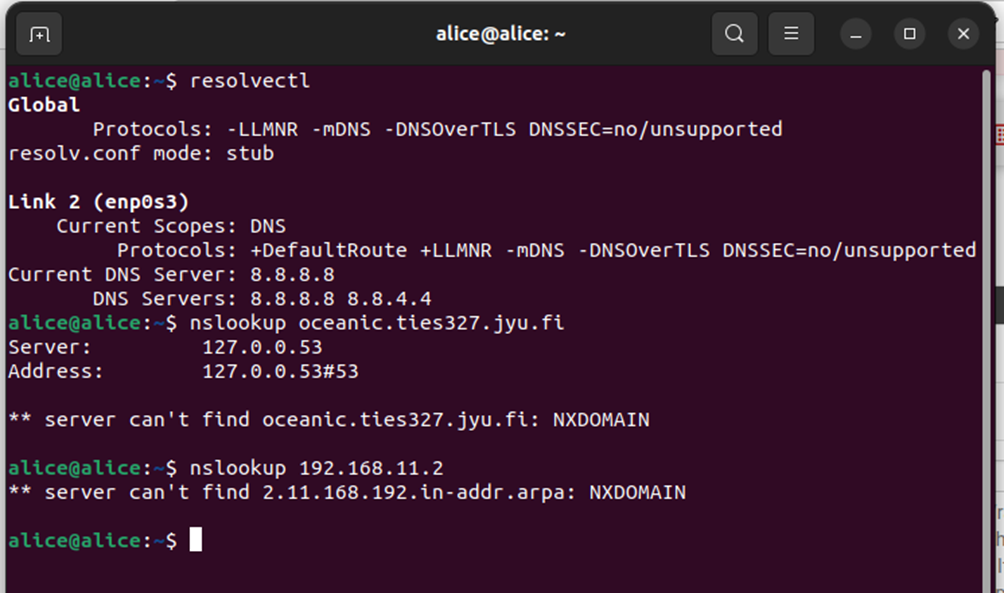
How could I try to fix this? Is there something that is wrong in the captures even if I missed it, or something else I could check?
I have also done this in dnsserv 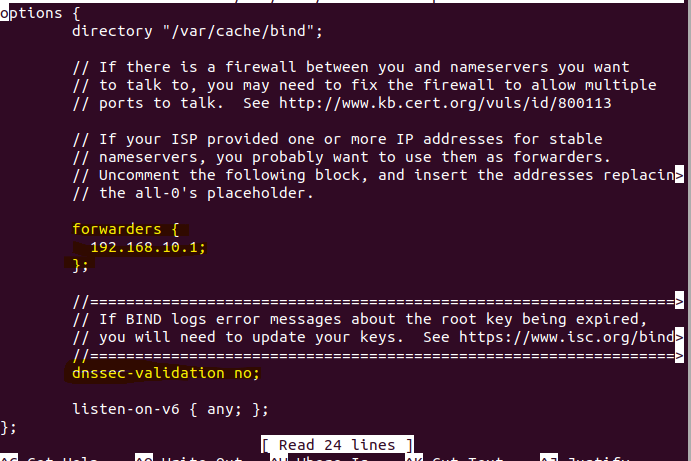
...And after hours of work my computer crashed, and now bob does not get connection to net anymore. Doesn't ping anything.
It is a bit late advice, but please do not leave everything to the last minute.
—I´m sick and have asked for extra time that was approved.
Answers for dns tunneling have been published, so I am not sure how you can be given an extra time; we have discussed with Timo and agreed that students who miss one or two assignments just have to do an extra assignment from 9-16.
See post below.
—But, the biggest problem now is the bob connection, as I cannot continue with any assignments at the moment, and I could not afford to wait until tuesday´s demo. Are there any advice how to troubleshoot this? e.g. what should read / be written in the nano (and where). Like last time this was solved with this: 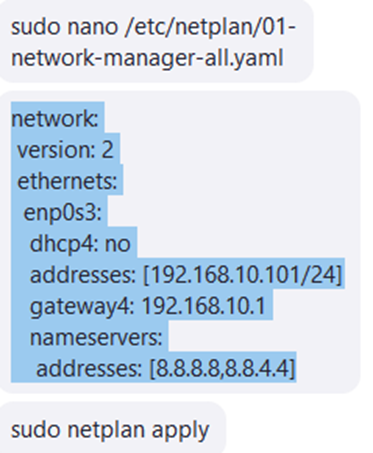 but what should be written now and where to make the connection work?
The problem is with your PC / VB, for some reason the DNS is not working as expected. I have no idea why. Is your router IP by any chance 192.168.10.1? In any case, I would recommend to move to the course's servers...
If you want to continue on your own PC, try this netplan configuration on both alice and bob first:
network:
  version: 2
  ethernets:
    enp0s3:
      dhcp4: yes
Followed by sudo netplan apply of course.
After that, try:
- ping 192.168.10.1
- ping 8.8.8.8
- ping google.fi
Post the result here.
—If name resolving is not working, try to set DNS to 8.8.8.8,8.8.4.4 as follows:
network:
  version: 2
  ethernets:
    enp0s3:
      dhcp4: yes
      nameservers:
        addresses: [8.8.8.8,8.8.4.4]
Then sudo netplan aply.
Try the same ping commands, post the result.
—Tadaa! 1st version did not work, the 2nd did the charm! 1st pinged ips but not google.fi. the 2nd option made it work: 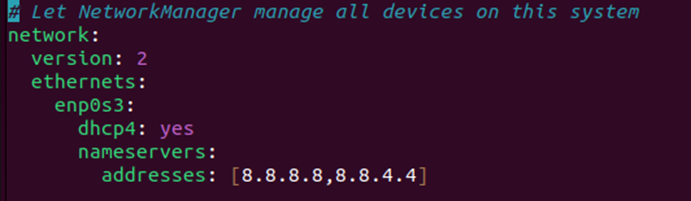
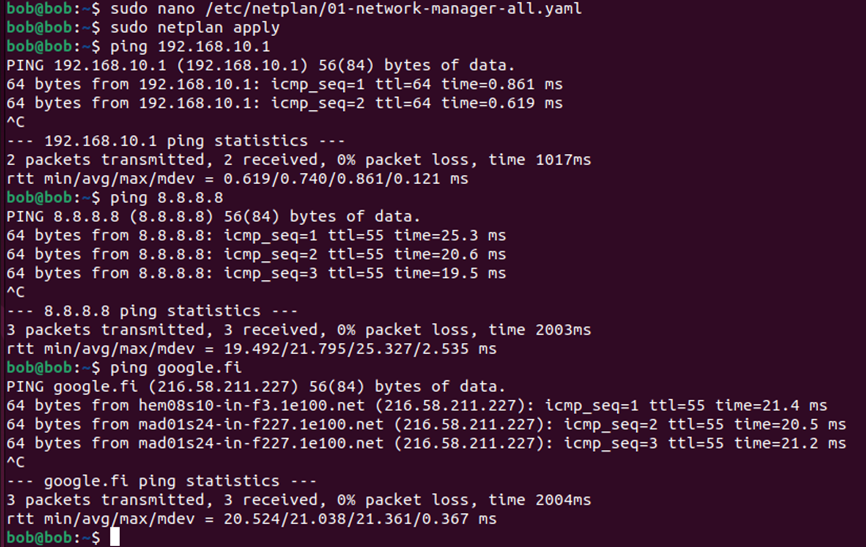 Thank you again!
Add message
33. Answers for the second set of assignments
Points are updated, answers can be found here.
If for some reason (no time or the assignment was too tough), you have not managed to get 2.5 points for one (or two) of the first 4 assignments, just do one (or two) of assignments 9-16 to earn needed points and get credits. This way you will not be able to complete the course with full 7 credits, but 6 is possible.
Edit: if you have failed in more than 2 assignments by this point - game over!
Edit2: if you target 7 credits - better luck next time.
Add message
34. Cant connect to Alice after assignment 5
After assignment 5 the Alice VM dosn't have the "result of the attack" and it doesn't ping anything so there's no connection. How do I fix this? Should I edit the netplan and what should I write there? Plz help.
You do not need to edit netplan if you have not done it before that. It should look like that:
network:
 version: 2
 ethernets:
  enp0s3:
   dhcp4: yes
Just make sure that yersinia is not running on bob anymore, reboot gateway, reboot alice, run "sudo netplan apply" on alice, everything should be fine after that.
Maybe you also forgot to enable DHCP on LAN, check from bob in pfsense web interface: Services -> DHCP Server. Should be enabled.
—thank you! probably the problem was not rebooting gateway :) that I forgot to do
Add message
35. Assignment 5 step 12. Can´t connect to oceanic.ties327.jyu.fi
I can't connect to the site in step 12. It gives "we can't connect to..." http was used (copypaste). Other sites work. Naturally WS can´t see anything then. How could this be fixed, or where to start troubleshooting?
The problem is your gateway does not forward DNS queries for some reason, so we set alice and bob to use google's DNS directly, obviously it will not be able to resolve oceanic.ties327.jyu.fi, because it is an imaginary website that only exists in our virtual network...
—Try like this.
First, test that you actually can connect to webserv by IP from alice:
$ ping 192.168.11.2Then, on dnsserv, open named.conf.options:
$ sudo nano /etc/bind/named.conf.optionsand change forwarders, e.g. to 8.8.8.8:
forwarders {
  8.8.8.8;
};
Restart bind9:
$ sudo systemctl restart bind9On alice, change netplan back to default one (comment out nameservers block with #):
network:
  version: 2
  ethernets:
    enp0s3:
      dhcp4: yes
$ sudo netplan applyThen test:
$ nslookup google.fi
$ nslookup oceanic.ties327.jyu.fi
If both are resolved, change netplan also on bob.
—This seems to have corrected the problem. Tests passed now. Thank you.
Add message
36. Alices IP was changed during 5th assignment
I am not sure at what point this happened, but Alice now has IP that ends with 200. Will this cause problems at later point? Can I change it back?
It is fine.
You can change, but why?
—It would probably be little bit easyer with wireshark filters, when I don't have to remember to change it every time.
You can try something like this:
On alice, change netplan to static:
network:
version: 2
ethernets:
  enp0s3:
  dhcp4: no
  addresses: [192.168.10.101/24]
  gateway4: 192.168.10.1
$ sudo netplan applyIn pfsense web gui, go to Diagnostics -> Edit File, copy-paste "/var/dhcpd/var/db/dhcpd.leases" to the path to the file to be edited, click "Load", then remove all "lease" blocks, click "Save".
Go back to alice (reboot maybe), change netplan back to dhcp:
network:
 version: 2
 ethernets:
  enp0s3:
   dhcp4: yes
$ sudo netplan apply
Add message
37. Assignment 9 WPA cracking - 6.3 Advanced
Have tried multiple ways but still no success with cracking Bobs password. Tried with both John and Hashcat. Used python script to generate all password variations based on the assigment which then run through (millions of hashes/passwords). Any hints what to look for to correct this?
There is not much to hint at, just read the assignment carefully, generate the list of possible passwords and check it with hashcat.
—Ok. Maybe the issue is on the python code...
Just to clarify the instructions:
if there are two vowels of the same kind, then one can be munged and another stays the original, same for consonants of the same kind: one can be in lower and another in upper case, e.g.: "liverpool", "liverpo0L", "Liverpo0L", "Liverp0oL", "liverp00l", etc are all valid passwords.
—
Add message
38. VirtualBox and servers disconnecting on short breaks
I have continuous problems of being thrown out by Virtual Box and/or servers, and then needing to get all to run again. To my experience, starting VMs has become slower and so unnecessary restarts take time from more important things, like really doing the assignments. VirtualBox can often turn to a black screen that does not react to commands. Server disconnects at leat once or more every day. That can happen in the middle of working on assigment, but especially in any short break. Unfortunately, it is impossible to never go to toilet. Restarting would not be a big problem, if machines were up fast again. So far unreliable connections have caused fot my VM need to reinstall gateway, webserv and dnsserv, since they did not start properly after many sudden disconnections. How to avoid sudden disconnections, or how to power up again without problems time after time?
I have never had any sudden disconnects from the servers, but ok, I will forward your message to the servers' admin. Are you sure that this is not caused by your Internet connection / provider?
—Hello Mikhail and Timo,
Please forward this long mail to students. I hope that it will explain few things.
Ok, at first I would recommend students to run this command at their home linux computers as it will help them to choose the server with the least load.
for i in 1 2 3 4 5 6 7 8 ; do ssh -l Anonymous tieskybs0$i.it.jyu.fi "hostname; w " ; done |
grep load
Replace username with your own username and install RSA keys to server at first. Easiest way to do this is command "ssh-copy-id Anonymous@tieskybs01.it.jyu.fi". Use your own username here too.
Ok, let's assume now that each have ssh keys in place and we can run the command above.
for i in 1 2 3 4 5 6 7 8 ; do ssh -l Anonymous tieskybs0$i.it.jyu.fi "hostname; w " ; done |
grep load
09:33:32 up 3:30, 2 users, load average: 1.37, 0.40, 0.16
09:33:33 up 3:30, 2 users, load average: 2.43, 2.62, 2.39
09:33:33 up 3:30, 1 user, load average: 0.00, 0.03, 0.19
09:33:34 up 3:30, 8 users, load average: 3.81, 4.93, 5.19
09:33:35 up 3:30, 6 users, load average: 3.88, 3.36, 2.42
09:33:36 up 3:31, 3 users, load average: 1.81, 1.35, 1.37
09:33:37 up 3:31, 4 users, load average: 1.52, 1.99, 1.31
09:33:38 up 3:30, 0 users, load average: 0.00, 0.01, 0.05Now we can analyze the output and get some useful information. There are 2 servers, i.e. tieskybs03 and tieskybs08, which don't have any load (load average == 0.00)
Although the list shows that tieskybs03 has one user logged in while load is 0.00 there is no user. This is a ghost user hanging on the server because the corresponding actual user has not correctly logged out from the server. He or she has just killed the VNC client which have left the VNC server process running on tieskybs03. Many students behave like this so the number of ghost servers will cumulate and they are consuming both CPU time and memory. This is one reason why servers will become slower.
Also these ghost processes may prevent future logins if there are not enough free memory left for new VNC sessions. If the memory allocation fails then user is thrown out.
Finally, one reason for disconnections is that the servers are rebooting every morning at 06.00am because of those hanging VNC processes. Reboot simple cleans the servers for new day.
So the correct way to end VNC session is to logout from server at first, then close VNC client and finally close SSH tunnel. If students can do this correctly then automatic reboots can be removed.
The reason for disconnections can also be due to the actions of network operators e.g. university's digiservices, Funet, mobile and fixed network operators. They have same reason for disconnecting i.e. hanging connections (=open connection without any data traffic) consumes resources so after some timeout period connections will be dropped down.
For eaxmple, if we think about mobile data connection from home to course servers there are actually lot of different network connections between the end points. If we break this into pieces then the first connection is from student's laptop to mobile home router over wifi, then second is radio connection from mobile router to nearest 2/3/4/5G base station, the third connection from base station to network operator's private IP network, the fourth from operator's private network to network traffic exchange hubs, the fifth from the hub to Funet, the sixth from Funet to JYUNET and finally from JYUNET to faculty's server network. The connection from home to servers is made up from all these and one can never assume that they all would work flawlessly all the time. We are now talking about 7 independent systems under 7 independent administrative control which all together make the connection from home to course servers.
So, it's not good idea to leave connections open over night, especially if one has open file in some editor. Please don't even start to work like this.
Hopefully the abobe explains also why network connections can be slower or faster on daily basis. I live outside of urban area where network speeds change a lot, from 300 kbits/s to 40 Mbits/s. I would say that the network connections are like the weather: it can be almost anything in Finland so get used to it.
One reason for slow virtual machines, especially if they start to become slower and slower, can be caused also how one has allocated the disk space for his or her virtual machine. One can allocate the whole disk space at once which leads into situation where the disk space is one big continuous file or one can allocate disk space on as needed-basis which allocates more disk space as it is needed. The latter leads into situation where the disk space is fragmented over several small files which makes disk I/O slow. Also the allocation process takes time: if virtual machine needs more disk space it requests it from the server running virtual machines which makes the actual disk block reservations and returns the pointers to these blocks to virtual machine which then makes file system on these blocks before writing the actual data onto them. The other virtual machine which has allocated all space at once simply writes to data onto disk and moves into next task.
It seems to me that someone has forgotten things learned at courses on operating systems, data networks, programming and data structures. Please learn to combine things together and analyze the situation instead of just reading exercise task descriptions. It helps to survive in the deep end where one goes always while facing new things and problems.
tl dr:
- You can select the server which has less load
- Log out before closing the VNC client and only after that close the SSH tunnel
Add message
39. Assignment 7, webserv-VM doesn't print HTTP POST packets
I have problems with printing the POST packets while running hydra from Kali-VM. Though the webserv-VM prints the POST packets whenever I'm in alice-VM, and try to login to the site. This doesn't work from kali-VM. The problem is in section 3.2.: "Run hydra against Alice's bank account". Did someone else face the same problem?
- I have internet connection on webserv, alice and kali
- There's no typo in the hydra command, I have copied it word to word from the instructions
More info: Seems like http(s)://192.168.11.2/accounts and 192.168.11.2 runs to timeout on kali-VM. Other sites, e.g. tim.jyu.fi works fine and fast.
Can there be firewall rules in pfsense on opt2 that block http from kali to webserv? Also check that snort does not block kali already.
—Thank you so much! In some previous assignment I had configured the opt2 firewall rules in a wrong way and forgot that they were still enabled. I removed them, and now everything works.
Add message
40. Assignment 7 scp permission denied
In assigment 7, part 4 section 5 "scp strange_login_attempt.zeek admin@192.168.10.1:/usr/local/share/zeek/site/" When I try to do this, it says admin@192.168.10.1 permission denied (publickey). What should I do?
Just follow the instructions, check also 1st tutorial about ssh access to pfsense, maybe forgot something there.
—sudo scp -i ~/.ssh/id_rsa.key strange_login_attempt.zeek admin@192.168.10.1:/usr/local/share/zeek/site/
Defining the key path manually solved this issue for me. I did reconfigure ssh to gateway based on first tutorial, however scp kept saying "permission denied".
Add message
41. Assignment 8, bridge issues
In assignment 8, section 3.9, after "sudo tcpdump -i enp0s8 host 192.168.10.102" when trying to catch packets with alice, there is none. I've tried to do the setup twice. I have internet connection with bob, alice and gateway. Also there's no blocking firewall rules for LAN, OPT3 or OPT4. Snort and Zeek are disabled. Also restarted the VM's a couple of times and tried again - no results. What's wrong?
Is it bob's ip though? Please check. Also check that interface enp0s8 is up. Promiscuous mode on alice-VM's opt3 interface should be "Allow All", double-check also that.
—Also when creating a topic, please use "add topic" button to create the topic name, then use "Add message" to add a message, this way there will be your name in the left top corner, so I can answer taking this into account, e.g. checking your other posts, maybe you had some problem before that can cause your current problem, etc.
—- Bob's ip is indeed 192.168.10.102
- Enp0s8 interface is also up
- Promiscous mode is also in 'Allow All' state
Still, no traffic is captured
This was solved; if you have similar problem, double-check that names of the new network adapters on alice and gateway are the same, i.e. opt3_username. For this purpose, you can use command "vboxmanage showvminfo", e.g.:
$ vboxmanage showvminfo gateway$ vboxmanage showvminfo alice
Add message
42. Answers for the third set of assignments
Points are updated, answers can be found here.
Add message
43. Assignment 9 WPA issues
My router ASUS RT-AX55 does not have simple WPA-Personal. It has WPA/WPA2-Personal but with this it automatically uses WPA2. Is assignment 9 doable with WPA2? I already tried this command: sudo aireplay-ng -0 1 -a <access point's BSSID> -c <client's MAC> but it doesn't have a handshake nor EAPOL label there.
If I remember correctly, it should be doable with wpa2, other students from previous years also asked this question but then managed to carry out the attack
—Sometimes to get the handshake, you need to disconnect the client, generate some traffic, etc.
—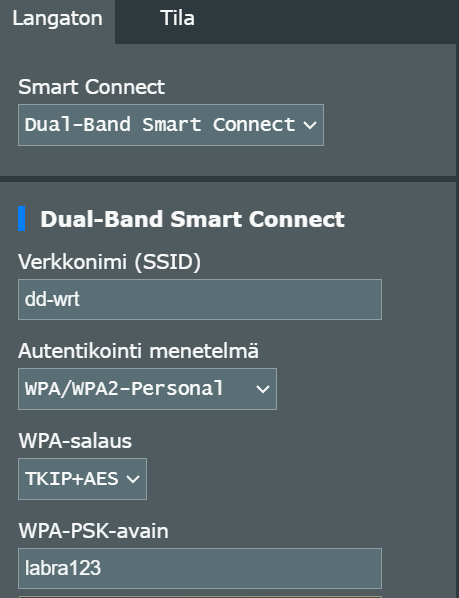
That is the closest I can get to WPA-Personal. My router is relatively new, so maybe that's why it doesn't have WPA-Personal option here, but WP3-Personal is available.
Add message
44. Assignment 8 tutorial 4.11 Bus Error
When I was doing the tutorial part 4.3 install numpy panda torch, there was a power outage at my home and I lost the internet connection. Due to this I could not log in to VM until it had a connection time out. After I got back in, I didn't know if the installation had finished or not. So, I tried it again. This caused the Alice terminal to crash. So, I rebooted Alice and tried again. Again it crashed. Later on the installation seemed to finish successfully. Everything else worked just fine, but when I got to step 4.11 training the model there was a Bus Error (core dumped). No idea what to do next.
No idea either, I would try to run that script on another VM or the host pc itself, i.e. you can collect a dataset on your alice, then run ML training / testing on another vm / host. It is not ideal, but at least you will able to complete the task.
Are you using your own pc or the course's server? You can also try to increase cpu + ram for the vm.
—Every time there was a reboot or crash, I set the enp0s8 interface up.
Add message
45. Assignment 7 tutorial 3.4 DNS
In DNS tunneling detection, bob's iodine gets REFUSED by command sudo iodine -f -P 12345 -r kali.ties327another.jyu.fi. Adding -T TXT or -T NULL do not help.
iodine: Got REFUSED as reply Retrying version check... iodine: couldn't connect to server (maybe other -T options will work)
I tried to update bob's and kali's iodines, it did not help. What to do?
make sure kali is not in "blocked" list in snort, double-check that dnsserv is running, I mean there are not many thing you have done since the dns tunneling tutorial, and it worked then, should work now...
—If you reconfigured your gateway and/or dnsserv (because of the disconnects if I recall correctly), look through the dns tunneling tutorial, there were some modifications introduced in the dns resolver on pfsense to be able to resolve kali. Make sure they are in place.
—I checked that all VMs are running and dnsserv is configured exactly as in dns tunneling tutorial.
I also disable snort and jumped to Intrusion detection with Zeek. Everything went well until in the end of that, notice.log had received no alerst at all. I run sqlmap 3 times, first no notice.log, in the 2nd and 3rd run notice.log was there, but empty.
Kali: [WARNING] HTTP error codes detected during run: 500 (Internal Server Error) - 40 times. [INFO] fetched data logged to text files under '/home/kali/.local/share/sqlmap/output/192.168.11.2'
pfsense fw rules
—I just noticed that when I restarted VirtualBox and VMs, SnortStatus is running, and I remember I turned it off. Can the system just deny turn off, or not save that mode and on restart continue as it was not turned off. Last night I noticed "freezing" in some VMs and commands needed to be given more than once.
More fun: kali has lost connection to everyone. No ping to even webserv. OPT2 is according to instructions. Kali did connect before, otherwise I could not have done previous assignments. I try to reinstall kali.
I removed and reinstalled kali. Now connections work again, but still same result with DNS:
bob@bob:~$ sudo iodine -f -P 12345 -r kali.ties327another.jyu.fi -T NULL Opened dns0 Opened IPv4 UDP socket Sending DNS queries for kali.ties327another.jyu.fi to 127.0.0.53 Using DNS type NULL queries iodine: Got REFUSED as reply Retrying version check... iodine: Got REFUSED as reply Retrying version check... iodine: Got REFUSED as reply Retrying version check... iodine: Got REFUSED as reply Retrying version check... iodine: Got REFUSED as reply Retrying version check... iodine: couldn't connect to server (maybe other -T options will work)
pfsense fw rules and dns resolver
—
Add message
46. Assignment 8 Alice: Network is unreachable
I added the network adapter opt3 and modified the settings according to the instructions. After that I restarted Virtualbox manager and started gateway, dnsserv, alice, bob and kali, but my Alice-VM no longer has connection to internet. When pinging anything, terminal says Network is unreachable. Command ifconfig doesnt show any ip address for Alice-VM. How do I fix this?
try to debug using faq post on top
—I have checked and tried everything mentioned in that post, but still cannot ping gateway (or anything else). Is there any way to remove the network adapter 5 (opt3) and then add it again since nothing else seems to work?
To disable the 5-th adapter:
$ vboxmanage modifyvm gateway --nic5 noneTo check that it is disabled:
$ vboxmanage showvminfo gatewayHowever, I do not think this is the cause of your problem, but you can try...
—Thanks, it indeed wasn´t the cause of my problem but showvminfo pointed me my mistake
Add message
47. Assignment 8: modifyvm not working in powershell
I tried to insert the command:
"C:\Program Files" modifyvm gateway --nic5 intnet
...into powershell, but it yields the following error:
"At line:1 char:50 + "C:\Program Files" modifyvm gateway --n ... + ~~~~~~~~ Unexpected token 'modifyvm' in expression or statement. + CategoryInfo : ParserError: (:) [], ParentContainsErrorRecordException + FullyQualifiedErrorId : UnexpectedToken"
I have tried to work around the matter, but so far with no success. It seems like "modifyvm" isn't a real command in windows, or something like that.
Hopefully someone can help, what am I doing wrong?
For some reason, the command I have used was pasted differently that I intended. The command that I have used is exctly the one as in the intructions: "C:\Program Files" modifyvm gateway --nic5 intnet", and it produces the error mentioned above.
Yet again it seems pasting the command into this context doesn't work. While typing here, the full command is shown, but after saving the comment, the command is shown in a short form which seems like I would be trying to say that I used the wrong code. The point is: even if I copy paste the code instructed in the instructions, it produces the error I presented before.
It seems I found a way to - seemingly at least - get this working. Instead of pasting the command provided in the instructions to powershell, I navigated to the directory shown in the quoted part of the command given in the instructions (I wont try to paste it here since it seems pasting here doensn't work correctly), though only up to the directory "VirtualBox", since it wasn't possible to cd into the next directory "VBoxManage". Then, in that directory ("VirtualBox"), I used the command: ./vboxmanage modifyvm gateway --nic5 intnet. So its seems the "./" part was required, although it wasn't provided in the instructions.
It works in command prompt without a problem; in power shell to execute the command you should add call operator "&" at the beginning, i.e.:
& "C:\\Program Files\Oracle\VirtualBox\VBoxManage" modifyvm gateway --nic5 intnet
Add message
48. Gateway doesn't start
It seems that I can't start the gateway anymore. I get the following messages when booting: 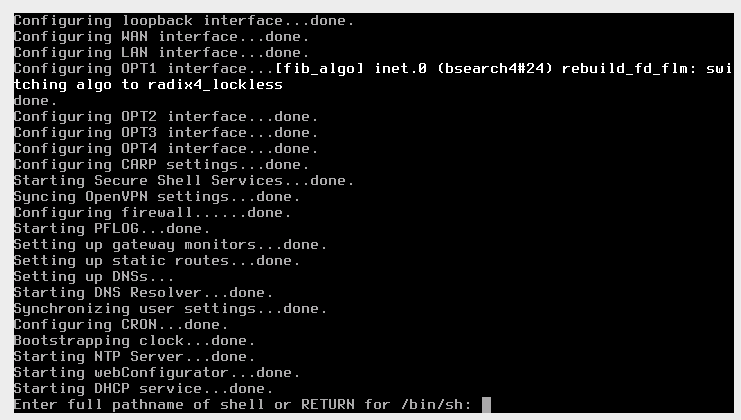 Has anyone encountered a similar problem? How can I resolve this?
It looks like its boot device is broken which can happen if you shut it down incorrectly. Just reimport the gateway VM. Check the first tutorial how it should be reconfigured: add default pass all rules for opt1 and opt2, ssh access from alice, mb something else do not remember.
—
Add message
49. AliceVM contains a filesystem with errors, doesn't start
Unable to start alice. Getting this on startup: 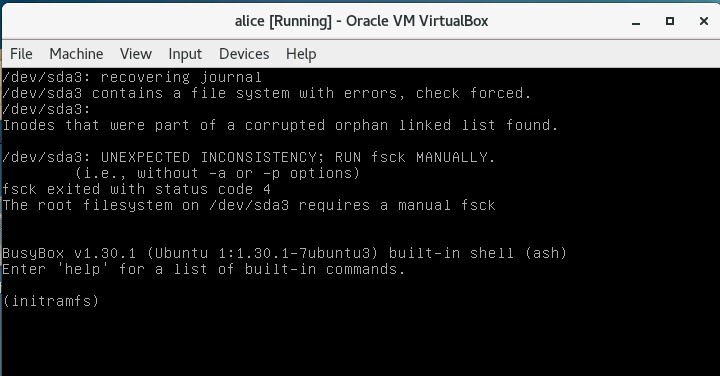
What can I do? This started when doing the basic assignment for Machine-learning-based intrusion detection. First time I was able to edit the config.py, but later I couldnt edit anything, got a filesystem read only.
I have no idea how you are able to do what you do with the VMs in this course. I have never seen these problems before :)
You can always reimport the VM that has crashed.
—Managed to fix it with the fsck. Used command: fsck -y /dev/sda3
All good now (I hope).
Add message
50. Deadlines = extended
New deadlines:
- Assignments 7-8: 15.10.2023
- Assignments 9-12: 29.10.2023
For assignments 13-16 the deadline remains the same: 12.11.2023.
The deadlines are firm, there will be no more extension even if tieskybs servers crash or work slow, Internet does not work, there is an electrical blackout, etc.
Add message
51. Why tieskybs servers are slow
Apparently, the VM disk images in tieskybs servers are stored on an NFS-mounted disk with bandwidth of... 10 Gb :) It is obviously not enough when there are many students run several VMs at the same time. It does not matter if you use the same server or different, they all use the same link with the file server. This is very poor configuration and if I understood correctly it cannot be fixed easily.
Therefore, for students who rely on the servers, I would not recommend to leave everything to the last moment, and try to complete the assignments way in advance.
Also, since the bottleneck most of the time is not computing and memory resources, but disk write/read operations, you can increase CPU and RAM for your VMs, e.g. as follows:
- Ubuntu Desktops, i.e. alice, bob and kali: 3-4 processors, 6144 MB of RAM
- pfSense and Ubuntu servers, i.e. webserv and dnsserv: 2 processors, 2048 MB of RAM
It can be done in "Settings -> System -> Processor" and "Settings -> System -> Motherboard" respectively.
Finally, I would recommend not to use the servers longer than you really need and switch off the VMs that you do not use. There are many practical assignments in the course that can be completed locally, so you do not even need to have the whole virtual network running, just one or two Ubuntu boxes.
Add message
52. Testing new tieskybs servers
Hi,
could you please forward this to students of TIES nad KYBS courses? Thanks in advance
I would like to get few volunteers for testing 2 different tieskybs server implementation.
The course servers were virtual servers running on physical servers and your VirtualBox instances were running on top these virtual servers. This experiment had some issues so I'm setting up 2 different implementations.
The first variation will differ from course servers in a way that the storage will be based on SSD drives instead of HDD drives and the interconnection will be upscaled from 10 Gbit/s to 40 Gbit/s. The setup will be otherwise similar i.e. VirtualBox running on top of virtual server running on physical server.
The second variation will have same SSD drive and networking as above but the virtual server will be removed from the middle. In other words the VirtualBox will run on physical server.
There will be 4 servers for both variations and I'll make them available in the beginning of next week. If you would like to help by testing and comparing these variations to course servers it would help us to develop better solutions for teaching.
If you are interested in this please drop email to jf@jyu.fi
Best regards, Juhani Forsman
Add message
53. Assignment 7, second PCAP file not printing anything
In assignment 5.2 I got the first attacker's IP address just by following the steps given in the assignment, but when trying to find the second address it's not printing anything when following the same steps (only changed the new file name compared to the previous steps). The second rule must be correct since I got full points for it, but I'm still not getting any alerts for the second attacker. Has anyone had the same problem?
Edit the rule from your first answer by removing lines 3 and 4, i.e.:
flow: established, to_server; \
content: "POST"; http_method; \
Add message
54. Answers for the 4th set of assignments
Points are updated, answers can be found here.
Add message
55. Tieskybs servers
I have not yet tested it, but I was told that tieskybs servers 1-4 should work much faster now: no KVM between OS and VirtualBox, SSD storage. Basically, disk write/read speed should not be a bottleneck anymore. A bit late though...
Add message
56. Assignment 11: Missing global address for webserv
I first did receive an ipv6 global address for webserv with the command "ifconfig" and managed to use it successfully. Then in part 10 of section 4.2, I couldn't find one anymore... Restarting webserv doesn't work...
After Ctrl-C:ing down all the stuff (except wireshark) that was going on in Kali, I soon received a global ip address for webserv again.
Obviously, it seems like a problem that there is no global address visible after killing the interfaces with kali and beginning advertisements... But now I ran into another problem. After shutting down the forementioned processes on kali and once again gaining a global ipv6 address to webserv, I am able to get to the point where I seem to be logged into webserver ftp (lftp webserv@fc00::1:a00:27ff:fe15:f6c1:~>), but when I try "ls" I am stuck in a view that says: "'ls' at 0 [Connecting...]"...
So, I'm not sure if I missed something in the instructions, but I didn't see an instruction to make the same rules for OPT1 as fot OPT2 to enable ipv4 and ipv6 packet transmission, but whatever the case, this solved the above mentioned problem of getting stuck into "Connecting" for me.
I also finally found a global address for webserv even with the processes running on Kali. My mistake may have been, that on the first attempt I may not have done the latter part of 4.2 part 8.
ok, so did it work in the end?
—Yes, it seemed to work!
nice!
—
Add message
57. Tieskybs servers 1-4
Tieskybs servers 1-4 are down, not sure if they will be resurrected any time soon (not this week at least). Please use servers 5-8.
Add message
58. TigerVNC ei toimi servereillä
Servereille 5-8 pääsee kirjautumaan, mutta kun kirjaudun TigerVNC:llä, se sulkeutuu. Ongelma ilmeni pe 20.10. noin klo 14. Sitä ennen VirtualBox toimi hyvin, mutta kun kirjauduin ulos ja pidin tauon, uusi kirjautuminen ei enää onnistu.
Pyydän korjaamaan ongelman ennen viikonloppua, että pääsee jatkamaan harjoituksia.
This problem seems to be over, possible to sign in with Tiger again.
Again. I signed out just as instructed, now I cannot sign in again. Why?
I guess there is some maintenance going on, I cannot login either, try a bit later, mb tomorrow
—Servers are broken. Admin is on holidays. Answer what you can and we'll extend the deadlines.
We are trying to repair the servers now. Let you know when they are up and running.
All servers 1-8 are up.
All servers tieskybs01-tieskybs08 are online and working. Cleaned the storage cluster and reinstalled everything so there should not be anything left from previous installation for entry exams and experiments.
Add message
59. Grade and ETCS
Hi, we are looking to complete this course with 5 ECTS, but it looks like we are going to be a couple of points short from reaching the grade 4. Can we do some exercises from the remaining assignments to get a few extra points to reach that grade, even though we wouldn't reach 2,5 points from these assignments?
Hi, you can just select one (only one!) more tutorial from the remaining ones and score at least 2.5 points. This way your grade will be increased but the amount of credits will stay the same. Just keep in mind that if you do two more, your grade will be recalculated accoring to 6 ects scale.
—
Add message
60. Finishing the course
I have done enough assignments to complete the course with 5 ECTS. Do I need to report this somewhere to finish the course, or do I just wait until the course has ended?
Just double-check your grade and ects numbers on the points page when it is updated, those will be copied to sisu (or whatever the name of the system that handles course completion is) after the last deadline, i.e. sometime in the middle of November I guess.
—
Add message
61. Assignment 15: Can't connect to alice/bob instance via ssh
I'm working on the course servers. I came to the point in the tutorial where I could create the floating ips and associate them to the instances (step 14). Everything looks fine also from the dashboard. When I try to connect via ssh from a new terminal (step 15) I get the following error: ssh: connect to host 192.168.10.3 port 22: No route to host.
What I've tried so far:
- I've reimported the whole vms once again, increased ram, and redid the tutorial.
- I've tried to restack and stack again.
- Deassociate the floating IPs and generate new ones + hard rebooted alice. (as suggested in the tutorial's comments)
- I've tried to import the Vms in my local VirtualBox on a windows pc but couldn't get the router to work. I got an error but I will look into it once more.
Unfortunately, until now nothing was successful. Do you have any tips how I could proceed?
Thank you!
Try on your own pc if possible, somebody reported the same problem when working on the server, I have not tried on the server, but it works on my local pc.
One more thing: you should be able to ssh to an instance after creating it, i.e. already in step 13, you do not need a floating ip for that; the floating ip is used to access external networks, e.g. ping google.fi, etc
—Yeah, it does not work on the servers, probably because of the fact that there is now a hypervisor between VirtualBox and the OS plus Openstack itself also uses hypervisor, so there are too many recursions I guess...
I therefore recommend to use your own pc.
—Thanks for the clarification.
Add message
62. Answers for assignments 9-12
Add message
63. Assignment 15 Poblem getting ssh connection to odl31 on course servers
I cannot get a ssh connection to odl31 on the course servers via linux terminals ssh odl@192.168.50.31 command. Should i install putty to the course server, or is there some other problem i might not be aware of ?
Add message
Check you can ping 192.168.50.31 and the ssh server is up at 192.168.50.31. If not restart it
64. Answers for assignments 13-16
Add message
Add new discussion topic
## CHANGE ONLY THIS LINE, DO NOT TOUCH ANYTHING ELSE (keep double hash in the beginning)

#- {forceclass="chat comments" .removePre}
\
[Add message]{.timButton .addAbove}These are the current permissions for this document; please modify if needed. You can always modify these permissions from the manage page.
When I copy a command from a tutorial to the terminal, it does not work!
— 09 Sep 23 (edited 09 Sep 23)Make sure that you have copied the command correctly, i.e. there are no line breaks, etc. The entire purpose of the "introduction" assignment was to teach students how to interact with the tutorials, i.e. copy the commands from tutorials and execute them in the terminal, but it looks like it was not enough :(
Double-check that you have editted the command, if it is instructed in the tutorial, make sure that you have not introduced any typos when doing that.