English version of the materials are work in progress!
Expect bugs, typos, and other issues. The English version is expected to be completed during spring 2026.
Defining Access Rights (DCL)
Authorization (Data Control Language, DCL) is based in SQL language on rights of users and user groups. Rights can be granted to different database objects, such as tables, columns, views, or triggers. This subchapter discusses theory and SQL commands related to authorization. There are two DCL commands in SQL language: GRANT and REVOKE. In addition, this subchapter discusses creating roles.
Users and User Groups
Relational database users can be identified through SQL interface. SQL standard does not define commands for creating users or user groups, but it generalizes both of these as so-called roles. Roles can be defined to act as both users and user groups. A role acting as a user group is usually identified by the fact that it cannot be used to log in to the database.
Roles can be granted to other roles. In this case, the role inherits rights of the role granted to it. In this way, hierarchies of users and user groups can be formed, and managing large numbers of users is more effortless.
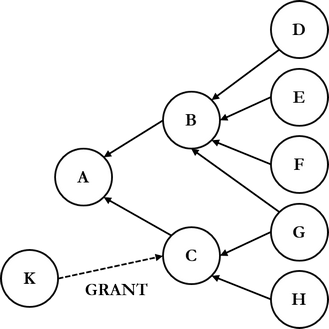
In the figure above, roles B and C inherit all rights of role A. Further, roles G and H inherit all rights of C, i.e., role H has all rights of C and A. When role K grants a new right to role C, the right is inherited automatically also to roles G and H.
A role is created with command CREATE ROLE, followed by role name. Usually only system administrators can create roles. For example, in PostgreSQL database management system, a role can be created in the following way:
The command would create a new role with a password, grant rights of role varastotyontekijat (warehouse workers) to the new role, allow the role to log in, and set the password to expire on May 8th.
A role is deleted with command DROP ROLE, followed by role name. Only role owner or system administrator can delete a role.
Access Privileges
Every database object has an owner, and the owner is by default the role that has created the database object. The owner has all rights to their database object, and the owner can grant and remove rights to this object from other roles. The table below lists most common rights according to the standard with explanations.
| Privilege | Allows to |
|---|---|
CONNECT |
Connect to database. |
SELECT |
See data. |
INSERT |
Insert data. |
UPDATE |
Update data. |
DELETE |
Delete data. |
EXECUTE |
Execute routines. |
ALL PRIVILEGES |
All mentioned above except CONNECT. |
SQL standard does not define commands for authorizing DDL statements, such as CREATE, ALTER, and DROP, but most products define them. By default, a user can however execute DDL statements in a schema they own. If one wants to grant or remove rights on a more fine-grained level, one can create a view and grant necessary rights to it.
Granting Access Privileges
Access rights are granted with command GRANT. General syntax of the command is the following:
GRANT keyword is followed by a right according to the table above, and multiple rights can be granted with one command. Database object can be for example a table, view, procedure, or catalog. With views, rights can be granted more fine-grainedly than with tables. WITH GRANT OPTION authorizes to grant the given right further. Let's examine the option with an example:
Now users (roles) matti and maija can grant with GRANT command both viewing and updating right to tyontekija (employee) table to other users.
According to SQL standard, insertion and update rights can be granted also column-specifically, if authorization targets a table or a view. In this case, the right name is followed inside parentheses by a comma-separated list containing column names, for example:
A role can be granted to other roles with the same command according to the following general syntax:
Revoking Access Privileges
Access rights are revoked with command REVOKE. General syntax of the command is the following:
Optional GRANT OPTION FOR additional clause revokes only the right to further authorize. If it is not used, the actual right is revoked. If a role is revoked from a user, and the user has further authorized some of their rights, the said rights are revoked also from those further authorized:
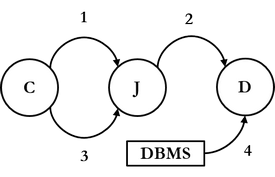
According to the figure above:
- Role C first grants a right to role J with
WITH GRANT OPTIONadditional clause. - Role J grants the right it received further to role D.
- Role C decides to revoke the right it granted from role J, in which case
- database management system automatically revokes the right also from role D.
A role can be revoked from another role according to the following syntax:
Käyttöoikeuksien määritys (DCL)
Valtuuttaminen (Data Control Language, DCL) perustuu SQL-kielessä käyttäjien ja käyttäjäryhmien oikeuksiin. Oikeuksia voidaan myöntää erilaisiin tietokantaobjekteihin, kuten tauluihin, sarakkeisiin, näkymiin tai triggereihin. Tässä alaluvussa käsitellään valtuuttamiseen liittyvää teoriaa ja SQL-komentoja. DCL-komentoja SQL-kielessä on kaksi: GRANT ja REVOKE. Lisäksi tässä alaluvussa käsitellään roolien luontia.
Käyttäjät ja käyttäjäryhmät
Relaatiotietokannan käyttäjät voidaan tunnistaa SQL-rajapinnan kautta. SQL-standardi ei määritä käskyjä käyttäjien tai käyttäjäryhmien luomiseksi, mutta se yleistää nämä molemmat ns. rooleiksi. Roolit voidaan määrittää toimimaan sekä käyttäjinä että käyttäjäryhminä. Käyttäjäryhmänä toimivan roolin tunnistaa tavallisesti siitä, että sitä käyttäen ei voida kirjautua sisään tietokantaan.
Rooleja voidaan myöntää toisille rooleille. Tällöin rooli perii sille myönnetyn roolin oikeudet. Tällä tavalla voidaan muodostaa käyttäjien ja käyttäjäryhmien hierarkioita, ja suurten käyttäjämäärien hallinnointi on vaivattomampaa.
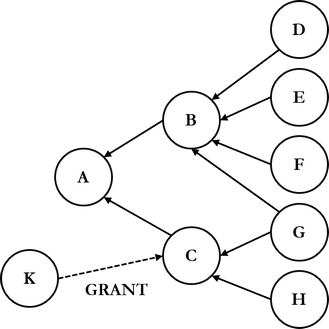
Yllä olevassa kuviossa roolit B ja C perivät kaikki roolin A oikeudet. Edelleen roolit G ja H perivät kaikki C:n oikeudet, ts. roolilla H on kaikki C:n ja A:n oikeudet. Kun roolit K myöntää uuden oikeuden roolille C, oikeus periytyy automaattisesti myös rooleille G ja H.
Rooli luodaan komennolla CREATE ROLE, jota seuraa roolin nimi. Tavallisesti rooleja voivat luoda vain järjestelmänvalvojat. Esimerkiksi PostgreSQL-tietokannanhallintajärjestelmässä roolin voi luoda seuraavalla tavalla:
Komento loisi uuden roolin salasanoineen, myöntäisi roolin varastotyontekijat oikeudet uudelle roolille, sallisi roolin kirjautua sisään ja asettaisi salasanan vanhenemaan toukokuun 8. päivänä.
Rooli poistetaan komennolla DROP ROLE, jota seuraa roolin nimi. Vain roolin omistaja tai järjestelmänvalvoja voi poistaa roolin.
Käyttöoikeudet
Jokaisella tietokantaobjektilla on omistaja, ja omistaja on oletusarvoisesti se rooli, joka on luonut tietokantaobjektin. Omistajalla on kaikki oikeudet tietokantaobjektiinsa, ja omistaja voi myöntää ja poistaa muilta rooleilta oikeuksia tähän objektiin. Alla olevassa taulukossa on listattu yleisimmät standardin mukaiset oikeudet selitteineen.
| Oikeus | Oikeuttaa |
|---|---|
CONNECT |
Muodostamaan tietokantayhteyden. |
SELECT |
Näkemään dataa. |
INSERT |
Lisäämään dataa. |
UPDATE |
Päivittämään dataa. |
DELETE |
Poistamaan dataa. |
EXECUTE |
Käynnistämään rutiineja. |
ALL PRIVILEGES |
Kaikki yllä mainitut paitsi CONNECT. |
SQL-standardi ei määritä komentoja DDL-käskyjen, kuten CREATE, ALTER ja DROP, valtuuttamiseen, mutta useimmat tuotteet määrittävät ne. Oletuksena käyttäjä voi kuitenkin suorittaa DDL-käskyjä omistamassaan skeemassa. Jos halutaan myöntää tai poistaa oikeuksia hienorakeisemmalla tasolla, voidaan luoda näkymä ja myöntää tarvittavat oikeudet siihen.
Käyttöoikeuksien myöntäminen
Käyttöoikeudet myönnetään komennolla GRANT. Komennon yleinen syntaksi on seuraava:
GRANT-avainsanaa seuraa oikeus yllä olevan taulukon mukaisesti, ja oikeuksia voidaan myöntää yhdellä komennolla useita. Tietokantaobjekti voi olla esimerkiksi taulu, näkymä, proseduuri tai katalogi. Näkymien avulla oikeuksia voidaan myöntää hienojakoisemmin kuin taulujen avulla. WITH GRANT OPTION oikeuttaa myöntämään annettua oikeutta edelleen. Tarkastellaan optiota esimerkin avulla:
Nyt käyttäjät (roolit) matti ja maija voivat myöntää GRANT-komennolla sekä katselu- että päivitysoikeuden tyontekija-tauluun muille käyttäjille.
SQL-standardin mukaisesti lisäys- ja päivitysoikeutta voidaan myöntää myös sarakekohtaisesti, jos valtuutus kohdistuu tauluun tai näkymään. Tällöin oikeuden nimeä seuraa sulkeiden sisällä pilkkulista, joka sisältää sarakkeiden nimet, esimerkiksi:
Rooli voidaan myöntää toisille rooleille samalla komennolla seuraavan yleisen syntaksin mukaisesti:
Käyttöoikeuksien poistaminen
Käyttöoikeuksia poistetaan komennolla REVOKE. Komennon yleinen syntaksi on seuraava:
Valinnainen GRANT OPTION FOR -lisämääre poistaa ainoastaan edelleenvaltuutusoikeuden. Jos sitä ei käytetä, poistetaan varsinainen oikeus. Jos käyttäjältä poistetaan rooli, ja käyttäjä on valtuuttanut jotakin oikeuttaan edelleen, myös edelleen valtuutetuilta poistetaan kyseiset oikeudet:
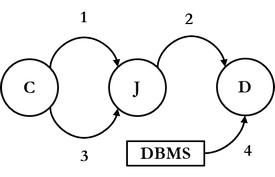
Yllä olevan kuvion mukaisesti:
- Rooli C myöntää ensin oikeuden roolille J
WITH GRANT OPTION-lisämääreellä. - Rooli J myöntää saamansa oikeuden edelleen roolille D.
- Rooli C päättääkin poistaa myöntämänsä oikeuden roolilta J, jolloin
- tietokannanhallintajärjestelmä poistaa automaattisesti oikeuden myös roolilta D.
Rooli voidaan poistaa toiselta roolilta seuraavan syntaksin mukaisesti:
These are the current permissions for this document; please modify if needed. You can always modify these permissions from the manage page.