English version of the materials are work in progress!
Expect bugs, typos, and other issues. The English version is expected to be completed during spring 2026.
Defining Database Structure (DDL)
Defining database structure (Data Definition Language, DDL; sometimes also called Schema Manipulation Language, SML) happens in SQL with e.g. commands CREATE, ALTER and DROP.
Data Types
SQL standard defines different data type alternatives for columns. SQL language is strongly typed, which means that a data type must be defined for each table column when the table is created. Common data types, according to the standard, are listed in the table below.
| Data Type | Description | Usage Example | Example Column | Example Value |
|---|---|---|---|---|
| CHAR, CHARACTER | fixed-length string | CHAR(10) |
SSN |
'111111-XXX' |
| VARCHAR, CHARACTER VARYING | variable-length string | VARCHAR(20) |
first_name |
'Seppo' or 'Viljami' |
| INTEGER, INT | integer | INT |
birth_year |
1990 |
| NUMERIC | (decimal) number (integer part and decimal part possibly limited) | NUMERIC(7,2) |
monthly_salary |
2600.12 |
| BOOLEAN | truth value | BOOLEAN |
order_confirmed |
TRUE |
| DATE | date | DATE |
order_date |
'2025-01-12' |
| TIMESTAMP | timestamp | TIMESTAMP |
payment_time |
'12:00:00' |
| ARRAY | list | INTEGER[7] |
lotto_numbers |
[1, 2, 3, 4, 5, 6, 7] |
| TEXT | text-format column | TEXT |
review |
'Kissa istuu puussa.' |
In addition to mentioned data types, different products also have other data types, such as data types for storing large binary data like text, images, audio, and video, and data types for spatial data.
Managing Tables
Tables are managed with commands CREATE, ALTER, and DROP. Before familiarizing with the syntax of commands, let's recall terms related to relations discussed in Chapter 3.1, but this time from SQL's perspective:
- A table has a header. The header contains names of columns in their creation order.
- A table has a degree. The degree tells the number of columns.
- A table has a cardinality. The table's cardinality is the number of rows in the table.
- A column has a cardinality. The column's cardinality is the number of different values it contains.
| astun | asnimi | kaup | tyyppi | mpiiri |
|---|---|---|---|---|
| a123 | Virtanen | Mikkeli | y | i |
| a125 | Kojo & Lipas | Kouvola | y | i |
| a134 | Liekki | Tampere | y | l |
Creating Tables
A table is created with command CREATE TABLE, and its general syntax is the following.
For example, the tuote (product) table of the example database could be created with the following SQL statement.
Huomautus
If creation of table succeeds, SQLite does not give any result table.
In material examples you can verify table creation e.g. with .tables command (shows all tables) or .schema table (shows schema of table table).
For example:
Note that commands are run immediately one after another. In material examples database is initialized after every run.
Harjoittele
Try modifying the SQL statement so that it also creates a table named osasto (department). The table has columns osastotunnus (department ID), osoite (address), pinta-ala (area) (with precision of two decimals) and onko_toiminnassa (is active), which is of BOOLEAN data type. Add rows to the table. You can preview added tables and rows with commands
Primary Key
Primary key (PK) is a column or set of columns that identifies table rows. In other words, thanks to the primary key, every row of the table is different. A primary key can be defined for a table either with table creation command or later by modifying the table. Adding a primary key with table creation command changes syntax in the following way:
For example
As with a relation, a table can also have only one primary key. If the primary key consists of more than one column, it must be created after column definitions:
For example
Foreign Key
Foreign key (FK) is alongside primary key the most important integrity constraint of a relational database. Foreign key is a column or set of columns that identifies a row in another table. Usually a foreign key refers to another table's primary key or part of it. The table to whose primary key the foreign key refers is called parent table of the relationship between tables, and the referring table child table. Foreign key limits the value set of the referring table's column to the values of the parent table's referenced column. Defining a foreign key is not mandatory so that a join can be formed between tables with an SQL statement.
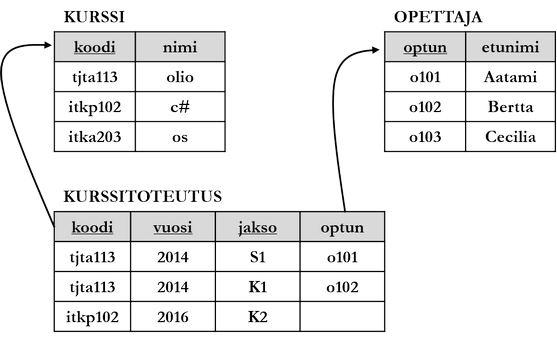
Referenced and referring column must be of the same data type. In SQL language, foreign keys are defined either in connection with table creation with CREATE TABLE command or by modifying an already existing table. General syntax is the following.
Here the table to be created with CREATE TABLE command will be the child table of the relationship. FOREIGN KEY additional clause is followed inside parentheses by a comma-separated list listing the referring columns of the child table, for example:
CREATE TABLE tilausrivi (
    asiakastunnus CHAR(10),
    tuotetunnus CHAR(10),
    maara INT,
    PRIMARY KEY (asiakastunnus, tuotetunnus),
    FOREIGN KEY (asiakastunnus) REFERENCES asiakas (asiakastunnus)
      ON UPDATE RESTRICT
      ON DELETE SET NULL,
    FOREIGN KEY (tuotetunnus) REFERENCES tuote (tuotetunnus)
      ON UPDATE RESTRICT
      ON DELETE SET DEFAULT
);
The additional clauses above tell the database management system how to act when changes happen in values of the parent table's referenced column or rows are deleted (so-called maintaining referential integrity):
RESTRICTprevents column changes or row deletion in parent table.SET NULLsets column value to null in child table.CASCADEcascades changes happened in parent table to child table column.SET DEFAULTsets child table column value to default value.
Harjoittele
Create tables according to the figure above (kurssi, opettaja, kurssitoteutus) with integrity constraints. Preliminary template for SQL statements is given below. Add rows to the tables.
Other Integrity Constraints
Integrity constraints can be set for columns in addition to primary and foreign key. Most common integrity constraints defined by SQL standard are the following:
DEFAULTclause sets a default value for the column.NOT NULLclause forbids null values from the column.UNIQUEclause guarantees that all values of the column are unique.CHECKclause can be used to check that column values follow given conditional expression.
For example:
Modifying Tables
Table structure is modified with DDL command ALTER TABLE. With the command one can for example:
- Change column data type.
- Change column name.
- Delete or create a new column.
- Delete or create integrity constraints.
Let's create below as example (PostgreSQL) first part of table columns with data types and add only after that integrity constraints and a third column:
There are even large product-specific differences in implementations of ALTER command. ADD, DROP and SET keywords can be considered as a general feature.
Deleting Tables
A table and all data contained in it are deleted with command DROP, which is followed by table name. If table is referred to with foreign keys, they can prevent delete operation.
Managing Other Database Objects
Other database objects like views, triggers, and procedures can also be managed with commands CREATE, ALTER, and DROP. Let's examine next simple examples of creating different database objects.
Views (view) are auxiliary tables created from SELECT statement results. However, they do not contain data, but are as their name suggests a real-time view to data. A view can be understood as a stored SELECT statement, with which one achieves e.g. simpler queries in application program (i.e. query is made to view, not tables), storing most common ad hoc queries and more fine-grained rights management.
With the statement above, a view containing a view to data according to its SELECT statement is created. View content can be further examined with SELECT statement, e.g. SELECT * FROM itäiset_asiakkaat;. The SELECT statement with which view is created can be how complex ever.
Triggers (trigger) are program code or SQL executed automatically when some condition is fulfilled. SQL standard defines that trigger activation is caused by SELECT, INSERT, UPDATE or DELETE command targeting either table or view. Below is an example of a trigger (Oracle), which allows delete operations targeting tyontekija (employee) table, but logs old values and delete operation execution time and performer.
Procedures and functions are program code stored in database, executed when called. Their usage targets can be almost anything, depending on target area and its needs. SQL standard defines function as a routine which can return one value. Procedure on the other hand is a routine which can produce multiple output parameters. With procedures and functions one can usually create more complex functionality than with triggers, as their functionality is not limited to SQL. Different products have different ways and languages to manage procedures and functions, for example:
- Oracle Database: PL/SQL or Java.
- SQL Server: T/SQL or .NET languages.
- PostgreSQL: PL/pgSQL, pl/python, pl/perl etc.
- libSQL (modern variant of SQLite): WebAssembly
Triggers, procedures, or functions are not discussed in this material in more detail.
Indexes
Indexes are data structures which can make search operations faster. SQL standard does not define a framework for indexes, so different products have very different indexing implementations. Let's examine next indexing ways established in relational database management systems on a general level.
Huomautus
This section goes slightly to the level of physical database modeling. Knowing this section is not essential for database usage. It is still good to recognize why indexing is done in databases and why it is profitable.
Structure
Established index type in relational databases is so-called B+-tree (B+-tree). According to it, index structure is tree-like and n pointers (pointer) and n-1 key values are placed in every non-leaf node. Key value tells where table row defined in search statement conditions is looked for: if searched value is smaller than key value, pointer found on left side of key value is followed. If on the other hand searched value is equal or greater than key value, pointer found on right side of key value is followed ending finally to tree leaf node, where there is reference to disk.
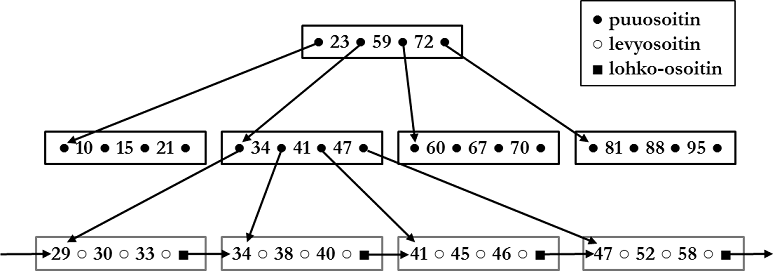
Index tree leaf nodes have key values, disk addresses, and block pointers. Disk addresses refer to that physical place on disk where indexed table row is stored. Block pointer refers to next leaf node of index. Key values are column values from indexed column.
Assume search statement SELECT * FROM henkilö WHERE ikä = 38; and assume index is according to figure above. Database management system follows index starting from root node. Pointer found on right side of key value 23 is followed from root node, because 38 > 23. Pointer found on right side of key value 34 is followed from next level node, because 38 > 34. Disk pointer is followed from leaf node to disk address where said row is stored and row is read to memory.
Operation
B+-tree is usually tried to be kept in memory except for leaf nodes. Imagine table tuote (product), having columns tuotetunnus (product ID), tuotenimi (product name), and hinta (price). Table primary key is tuotetunnus column and table has 10 000 rows. Assume simple SQL search statement:
Without index database management system has to read through in worst case all 10 000 rows of table and compare tuotetunnus column value to desired value 5200. If we assume simplified that reading one block from disk takes 10 ms, and one row fits in one block, operation reading whole table takes 10 000 rows * 10 ms = 100 seconds.
If again tuotetunnus column is indexed, but index is not in memory, database management system has to do n+1 disk reads: row read from disk and n reads to index. Note that here n is height of index tree, which can be significantly smaller than number of rows in table. Gain in speed comes from the fact that even in worst case row reads can be minimized.
Indexes are defined through SQL interface with DDL statements. Below are presented simple examples of defining indexes.
These are the current permissions for this document; please modify if needed. You can always modify these permissions from the manage page.